

Table of Contents
Where Writers Keep Track of Characters, World Details, and What Happened in Book One
You're 60,000 words in. A character walks into a room and you stop, because you cannot remember whether you gave her a brother in chapter four. You scroll back. You lose twenty minutes. You find the brother, except now his name is different.
This is the part of novel writing nobody warns you about. Not the blank page. The bookkeeping.
Here's what writers actually use to handle it, what each option is genuinely good at, and where each one lets you down.
The short answer
- Scrivener if you want everything in one desktop project and you're happy doing the remembering yourself.
- Campfire if your story runs on structured elements: characters, species, maps, timelines.
- World Anvil if you're building a world deep enough to need a wiki.
- Obsidian or Notion if you already think in linked notes and don't want to learn a writing app.
- Novelcrafter if you want a codex plus AI and you don't mind bringing your own model.
- Sudowrite if you want the notes to do more than sit there, because the AI drafting your next chapter reads them.
The real split is simpler than the feature lists suggest. Every tool below will store your notes. Only some of them do anything with those notes while you write.
1. Scrivener
The one most novelists land on first, and for good reason. Scrivener describes itself as a typewriter, ring-binder, and scrapbook in one, and that's accurate. Your manuscript lives in a binder you can rearrange, you get a corkboard for scenes, and you can keep character and setting sheets right beside the draft. Research PDFs, images, and reference notes all live in the same project file.
Good at: structure. If your problem is that your book is in seventeen Word files and you can't see the shape of it, Scrivener fixes that in an afternoon.
Where it lets you down: it's a filing cabinet, not a memory. Scrivener will hold your character sheet forever and never once remind you that she had a brother. The recall is still your job. It's also a one-time purchase desktop app, which some writers love and others find dated.
2. Campfire
Campfire breaks a story into modules you turn on as you need them: Characters, Maps and Locations, Species, Timelines and Calendars, Worldbuilding, Stories. You build out the pieces you care about and skip the rest.
Good at: relationships and chronology. If you keep contradicting your own timeline, a dedicated timeline module beats a document full of dates.
Where it lets you down: it can become a second hobby. Filling in modules feels like progress in a way that writing chapter eleven does not.
3. World Anvil
A worldbuilding wiki. Interlinked articles, maps, timelines, the whole encyclopedia. Fantasy and science fiction writers with deep secondary worlds tend to end up here.
Good at: depth and cross-referencing. When your lore has lore, you want something built for that.
Where it lets you down: it's a world tool more than a manuscript tool, and the gap between "my world is documented" and "my book is written" is wide.
4. Obsidian or Notion
Not writing software, which is exactly the appeal. A note per character, a note per location, links between them, and a search box that works.
Good at: flexibility, and staying out of your way. Obsidian keeps everything as plain files on your own machine, which matters if you're wary of putting an unpublished manuscript on someone's server.
Where it lets you down: you build the system yourself, and the system you build at 20,000 words is rarely the one you need at 90,000.
5. Novelcrafter
A codex of characters and world elements, wired into AI drafting, with a 21-day trial and a community of 220,000+ authors. You connect your own AI model.
Good at: control, if you like choosing models and tuning how they're used.
Where it lets you down: bringing your own API key is a real setup cost, and the running cost is yours to manage on top of the subscription.
6. Sudowrite
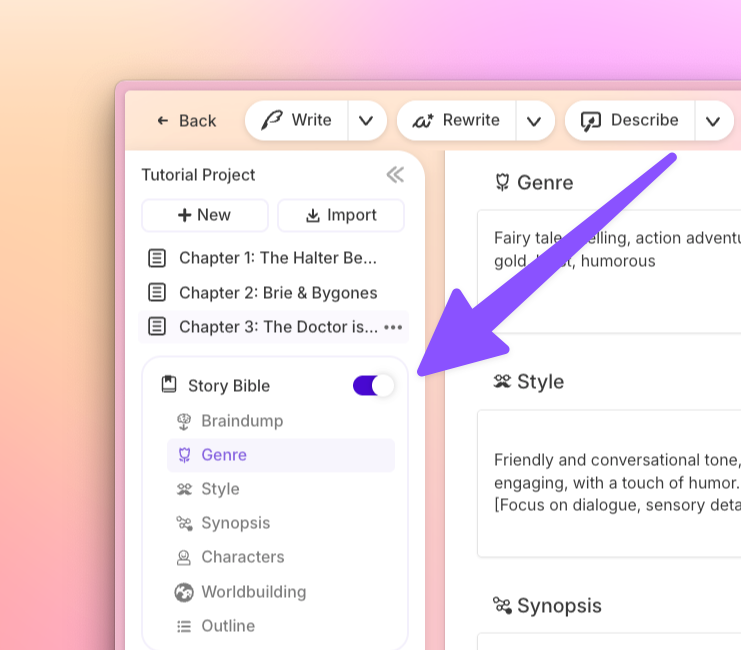
Sudowrite calls its notes the Story Bible, and the difference is what happens to them after you write them down.
Your Characters section holds a card per character, with traits, a role, and a version history so you can see what you changed and when. Worldbuilding holds settings, items, lore, anything you need to stay consistent about. So far, so ordinary.
The part that isn't ordinary: when you ask Sudowrite to write, it reads those cards. Not all of them at once, which would be noise. Something called Saliency Engine does a pass first and works out which of your characters and world details are actually relevant to the scene you're writing, then hands only those to the AI. The docs use a good example: if your shifter is in wolf form, it won't have him reaching for the pleated khakis he wears to the office.
And when you don't want the AI to know something, you hide it. Hover a character card, click the eyeball, and it's gone from the AI's view until you turn it back on. You can do it trait by trait too, which matters more than it sounds. If you're writing a mystery and you've filled in the murderer's motive, you can hide just that field so it doesn't leak into a scene forty pages before the reveal.
Good at: the remembering, rather than the storing.
Where it lets you down: it's a subscription, and it's built for fiction specifically. If you want a general-purpose second brain, this isn't it. Plans start at $10/month for Hobby & Student, and there's a free trial with no credit card.
How do you remember everything when you're writing a really long book?
You don't. You externalize it, and the trick is externalizing it somewhere that hands it back at the right moment.
Three habits do most of the work:
- One card per character and per world element, updated the day you invent it. Not later. Later never comes, and the detail you skip recording is always the one you contradict.
- A record of what actually happened, not just what you planned. Outlines drift. The scene you wrote is the canon, not the scene you outlined.
- Something that reads your notes back to you while you draft. This is the step most setups skip, and it's the one that decides whether you catch the contradiction or ship it.
In Sudowrite that last part is automatic. When you use Write in a chapter that's linked to the one before it, it pulls in up to 20,000 words of your actual prose, looking back through as many as 25 linked chapters, most recent first. So it isn't working from your summary of the story. It's working from the story.
What do writers use to keep notes on characters and world details while they draft?
The honest answer is that most working novelists use two things: a manuscript tool and a notes tool, and they resent switching between them.
The most common pairings are Scrivener plus its own character sheets, Obsidian or Notion plus whatever they draft in, Campfire or World Anvil when the world is the hard part, and Sudowrite when they want the notes and the drafting in the same place.
What separates them is not how the notes look. It's whether the notes are live. A Scrivener character sheet is a document you consult. A Story Bible character card is context the AI reads before it writes the next paragraph. Both are legitimate. They solve different halves of the problem, and if you draft with AI at all, the second half is where the continuity errors actually come from.
I keep losing track of my characters' arcs between chapters. Is there something that handles this?
Yes, and the feature you want is chapter linking rather than note-taking.
In Sudowrite it's called Chapter Continuity. Click the ••• beside a document title and you get two questions: is this document in your Outline, and does this document continue another one. Answer the second one and you've told Sudowrite which chapter comes before this one.
From then on, Write and Draft treat those separate documents as one continuous story, reading backward through up to 25 linked chapters and up to 20,000 words of prose. Chapters you generate from your Outline get linked automatically, in sequence. If you jump ahead and write chapter nine before chapter seven, it looks back for the most recent connected chapter and links to that instead.
It also handles the structures that break most tools. Alternating POVs, nonlinear timelines, dual timelines: you set the connections yourself, or disconnect them, whenever you like.
For the arc question specifically, the other half of the answer is Chat. It sits in the right bar of your project and can already see your Braindump, Genre, Style, Synopsis, Characters, Worldbuilding, and Outline, plus the full text of whatever document is open. You can ask it directly whether a character's motivation in chapter twelve follows from what you set up in chapter three. Chat only mode is effectively unlimited and doesn't use credits, so this kind of question costs you nothing but the time to ask it.
I'm writing a series and I can't keep the details consistent across books. Help?
This is where most tools quietly stop working, because they're built around one project at a time.
A Series Folder in Sudowrite is the fix. Create one from the + New button on your homepage, put your books inside it, and every project in that folder shares Characters, Worldbuilding, and Outline visibility. Create Jane in book one and she's there in book two, editable, with the same history. Change her in book three and the change lands everywhere. Sudowrite even shows you which book each character was originally created in.
Crucially, this isn't just a convenience for you. The AI has access to the shared Characters and Worldbuilding across the whole series, so a chapter drafted in book four is written with book one's canon in view.
Two things worth knowing before you set it up:
- Hierarchy matters. Series folders only share Story Bible data between projects at the same level. If you nest a sub-folder of projects inside a Series folder, those projects won't share data upward.
- Prune per book. Because the AI can see everything in the series, it's worth hiding characters who don't appear in the volume you're currently writing. Same eyeball toggle. A character who died in book two shouldn't be wandering into book four's scenes.
I'm on book three and I keep contradicting things I established in book one
Assuming book one is already written and living somewhere else, you have a retrieval problem before you have a consistency problem.
The fastest route is to import it. Sudowrite's Import Novel takes a finished or partial manuscript and builds the Story Bible from it, pulling out characters, worldbuilding elements, and an outline automatically. It's optimized for documents up to 120,000 words, focuses on your five to seven primary characters, and accepts .txt, .doc, .docx, .rtf, and .odt. If book one lives in Scrivener, back the project up to a .zip and import that directly; your folders and documents come across intact.
Then drop the imported project into a Series Folder alongside book three, and book one's canon becomes context the AI reads while you draft.
You'll still need to review what the import produced. It picks primary characters, not every character, and it will invent placeholder names for anyone you never named. But going from "book one is a 90,000-word .docx I have to search by hand" to "book one's characters and world are structured data my drafting tool reads" is an afternoon's work, not a month's.
How do pantsers keep their story straight without an outline?
By recording backward instead of planning forward.
Outlining and note-keeping get treated as the same activity, and they aren't. An outline is a promise about what will happen. A story bible is a record of what already did. Pantsers can skip the first entirely and still need the second, badly, because discovery writing generates continuity debt faster than any other method.
The practical version: write the scene first. Then spend two minutes adding whatever you just invented to a character or worldbuilding card. You're not deciding anything in advance. You're catching what you already decided before you forget it.
Chapter linking helps here too, because it means the tool follows your actual chapters rather than a plan you never made.
FAQ
Do I need a separate worldbuilding app if I'm using a writing tool with a story bible? Usually not, unless the world is the point. If you're writing secondary-world fantasy with centuries of invented history, a dedicated wiki like World Anvil earns its place. For most novels, a characters section and a worldbuilding section inside your drafting tool covers it, and the reduced switching is worth more than the extra features.
Can I hide plot twists from the AI so it doesn't spoil them? In Sudowrite, yes, at both card and trait level. Toggle the eyeball on a character or worldbuilding card and the AI ignores it completely. Toggle it on a single trait, like a murderer's motive, and only that field is hidden while the rest of the card stays visible.
Does any of this work if I've already written most of my book somewhere else? Yes. Import Novel builds a Story Bible from an existing manuscript up to around 120,000 words, Import Scrivener brings a Scrivener project across with its structure intact, and Document Import drops a single file into an existing project with no size limit and no changes to your Story Bible.
What's the difference between a story bible and an outline? An outline is what you intend to write. A story bible is what's true about your story: who the characters are, how the world works, what's already happened. You can write a novel without an outline. Writing a long one without a story bible is how continuity errors get into print.
Will the AI see everything I put in my story bible? Only what you let it see, and only what's relevant. Visibility settings let you hide any card or trait outright. Beyond that, Saliency Engine selects the details that matter for the specific passage being written rather than dumping your whole bible into every request.
The one that matters
If your notes live in a filing cabinet, you're still the one who has to remember to open the drawer. That works fine for 30,000 words and starts failing somewhere around 60,000, and it fails completely in book three.
Sudowrite was built by two novelists, Amit Gupta and James Yu, who ran a writing group before they built the tool, and the Story Bible exists because they hit this wall themselves. Over 300,000 writers use it now.
You can try it free, no credit card. Import what you've already written and see what it makes of your world.