

Table of Contents
"Plan your novel" sounds like "kill your creativity" — especially if you're a discovery writer who'd rather eat glass than write a traditional outline. But here's a shocking statistic: 79% of writers who outline finish their first draft (NaNoWriMo Participant Survey, 2023). The other 21%? Most are still stuck in the "I'll figure it out later" phase, 60,000 words deep in a story that stopped making sense around chapter 12.
Visual story planning isn't about locking yourself into a rigid beat sheet. It's about giving your creative brain a map — one you're absolutely allowed to redraw, scrap, or set on fire. Sudowrite's Canvas makes that map dynamic, flexible, and genuinely useful for every type of writer, from meticulous plotters to die-hard pantsers.
What Is Visual Story Planning?
Visual story planning is the practice of mapping your novel's characters, scenes, arcs, and themes in a spatial, non-linear format — using cards, connections, and visual layouts rather than traditional sequential outlines — allowing you to see your entire story architecture at once and identify structural patterns, plot gaps, and narrative opportunities that linear documents bury. It's what Vladimir Nabokov was doing with index cards in the 1960s (Literary History), except now the cards are digital, infinite, and smart enough to talk back.
Why It Matters
Your Brain Wasn't Built for Linear Outlines
You've got 47 scenes, 6 character arcs, a ticking-clock subplot, and a romantic thread that might be going nowhere — and you're tracking all of it in a Google Doc. That's not planning. That's hoarding words and hoping for the best.
Your brain processes spatial information faster than sequential text. 67% of published authors use some form of visual planning (Writer's Digest Annual Survey, 2023), and there's a good reason: visual layouts let you spot structural problems before they become 40,000-word rewrites. As Rachel Kim puts it, "The visual layout isn't just pretty — it fundamentally changes how you think about story structure. You start seeing patterns you'd never catch in a linear outline."
The Numbers Don't Lie
Average novel completion time drops from 14 months to 8 months with structured planning (Author Guild Survey, 2022). That's not a marginal gain — that's getting your book out six months earlier. And 82% of Sudowrite Canvas users say visual planning reduced mid-novel stalls (Sudowrite User Survey, 2024). Canvas users also average 23% more writing sessions per month than non-visual planners (Sudowrite Platform Analytics, 2024). The correlation between visual planning and actually finishing your book isn't subtle — it's overwhelming.
When Pantsers Hit the Wall
Picture this: You're 50,000 words into your novel. The magic that carried you through act one dried up somewhere in the sagging middle. You've written yourself into three contradictory subplots, your protagonist's motivation shifted without you noticing around chapter 12, and you can't remember if the sidekick knows about the betrayal yet. Kayla lived this: "I used to lose track of subplots around chapter 15. With Canvas, I can see my entire story architecture at a glance."
Even Sarah Chen, a self-described pantser, concedes: "I thought planning would kill my creativity. Canvas proved me wrong — it's like having a safety net that lets me take bigger creative risks." Planning doesn't kill discovery. It gives discovery somewhere to land.
How It Works
Canvas as Your Story's Command Center
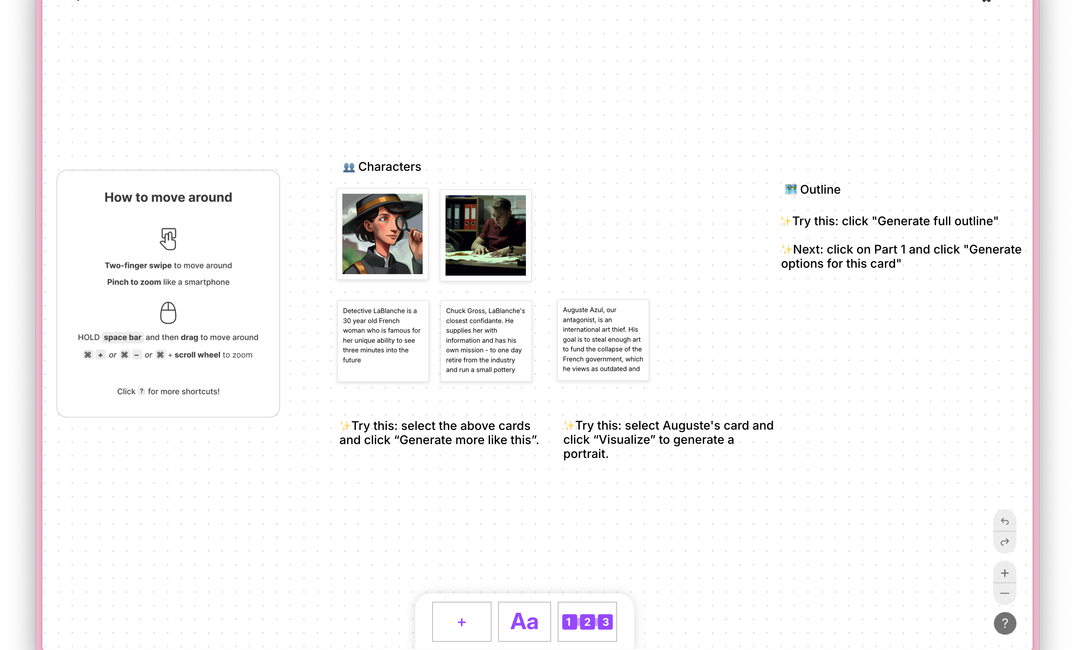
Imagine dropping every character, scene, and theme onto an infinite whiteboard — then dragging them around until your story clicks. That's Canvas. Joe Vasicek went "from drowning in sticky notes to having a living, breathing map of my story." Whether you're a plotter building a three-act beat sheet or a pantser pinning loose ideas, vibes, and "what if" fragments, Canvas adapts to your process, not the other way around.
Cards, Connections, and the Big Picture
Multi-POV novels are structural nightmares without visual mapping — 91% of multi-POV novelists report structural challenges without it (BookBaby Author Survey, 2023). Canvas solves this with:
- Cards for scenes, characters, settings, and plot threads
- Connections drawn between related story elements
- Color-coding by POV, timeline, subplot, or emotional arc
- Drag-and-drop rearrangement of your entire narrative
For series writers, the stakes are even higher. Liese Sherwood-Fabre, deep into a 12-book series, says Canvas is "the only tool that lets me track continuity across multiple volumes without losing my mind."
AI That Thinks With You
Writers using AI-assisted tools report 3x faster worldbuilding completion (Sudowrite Internal Data, 2024). Canvas doesn't just store your ideas — it helps develop them. The AI suggests character motivations, identifies plot holes, and brainstorms scene alternatives while you maintain creative control. Mike Torres nails it: "The AI suggestions don't write for you — they help you see connections you missed. It's like having a writing partner who never sleeps."
How Canvas Compares
| Feature | Canvas | Scrivener | Index Cards | Notion |
|---|---|---|---|---|
| Visual spatial layout | ✅ Infinite canvas | ⚠️ Corkboard only | ✅ Physical, limited | ⚠️ Limited views |
| AI integration | ✅ Built-in | ❌ None | ❌ None | ⚠️ Third-party add-ons |
| Real-time flexibility | ✅ Drag & drop | ✅ Drag & drop | ❌ Manual rearranging | ✅ Drag & drop |
| Series / multi-book | ✅ Unlimited scale | ⚠️ Per-project | ❌ Impractical | ✅ Database relations |
| Story-specific tools | ✅ Character & scene cards | ✅ Templates | ❌ Generic | ❌ Generic |
| Learning curve | Low | Medium | Low | High |
David Park switched "from Scrivener's corkboard to Canvas because I needed something that could keep up with how fast I iterate on story ideas."
Getting Started with Canvas
- Start with your characters. Drop a card for each major character with their goals, fears, and arc trajectory. Messy is fine — you're not writing a character bible, you're mapping a story.
- Map your anchor scenes. Not every scene. Just the ones you know: the opening image, the midpoint reversal, the climax, the resolution. Connect them to the characters involved.
- Fill in the messy middle. This is where plotters and pantsers diverge — and that's the point. Plotters: build your beat sheet card by card. Pantsers: pin your vibes, images, snippets of dialogue, and "what if" sparks. Both approaches work.
- Let AI pressure-test your structure. Use Canvas's AI to brainstorm scene transitions, flag missing subplots, or stress-test your character arcs. James Cooper says it best: "Canvas handles the organizational overhead so I can focus on what matters: telling a good story."
Best Practices
- Revisit your Canvas weekly. It's a living document, not a one-time planning session. Update it as your story evolves and surprises you.
- Color-code ruthlessly. Assign colors by POV, timeline, or emotional arc. Your future self — drowning in act two — will thank you.
- Leave white space. Don't plan every scene. The best moments often emerge from gaps in your map. Over-planning kills the discovery that makes writing fun.
- Use connections intentionally. If every card connects to every other card, you've built a conspiracy board, not a story map.
Common Mistakes to Avoid
- Over-planning before drafting. If you've been in Canvas for three months without writing a single chapter, stop adding cards and start writing. The plan exists to serve the draft, not replace it.
- Treating the plan as sacred. Characters surprise you. Subplots emerge. Move the cards. Delete the cards. The best novel plans are the ones that change.
- Using Canvas as a corkboard only. You're paying for AI-assisted story development. Use the AI features to pressure-test your logic, not just as a digital pinboard.
Frequently Asked Questions
Can I use Canvas if I'm a pantser?
Yes — Canvas is designed for flexibility, not rigidity. Pin loose ideas, images, and "what if" fragments without committing to a linear outline. Use as much or as little structure as your process demands.
Is Canvas only useful for novels?
Canvas works for any long-form narrative project, including screenplays, series bibles, memoir, and narrative nonfiction.
Does the AI write my outline for me?
No. The AI suggests and brainstorms — you make every creative and structural decision. Think of it as a collaborator who asks good questions, not one who takes over.
How does Canvas compare to Scrivener's corkboard?
Canvas offers built-in AI integration and an infinite spatial layout that Scrivener's fixed corkboard view can't match. See the comparison table above for a full breakdown.
Do I need to plan my entire novel before I start writing?
No. Many writers start with 5–10 anchor scenes and fill in gaps as they draft. Canvas supports iterative planning alongside active writing.
Can Canvas handle a multi-book series?
Yes. Canvas scales to track continuity, character evolution, and plot threads across unlimited volumes — which is why series authors rely on it.
Is my work private in Canvas?
Your content remains private and is never used to train AI models.
Related Reading
Other craft-focused Sudowrite guides:
- Story Bible Template: How to Build One with Sudowrite — the foundation every feature here depends on
- How to Write a Book Series Without Losing Track — Series Folder and cross-book continuity
- Best AI Writing Tool for Series Writers — Sudowrite vs. Scrivener + ChatGPT for multi-book projects
- Co-Writing with AI: How Sudowrite Helps Without Taking Over Your Voice — staying in control as you scale with AI
Key Takeaways
- Visual story planning helps both plotters and pantsers finish novels faster and with fewer structural rewrites
- 79% of writers who outline complete their first draft — visual structure works
- Canvas replaces sticky notes, spreadsheets, and scattered documents with one spatial, AI-assisted workspace
- AI-assisted planning cuts worldbuilding time by 3x and reduces the mid-novel stalls that kill projects
- The best plan is one you'll actually use — start messy, refine as your story reveals itself
Ready to see your story from above? Try Canvas for free →