

Table of Contents
You're 200,000 words deep into a five-book fantasy series, and you just realized the capital city changed continents between book two and book four. Your magic system has three different sets of rules depending on which manuscript you open. And your protagonist's eye color? Let's not talk about it.
Fantasy series are brutal. According to the Authors Guild 2025 survey, 90% of writers believe authors should be compensated for AI training use, but many professional novelists are still finding productive ways to use AI writing tools. The challenge is that most of those tools forget everything the moment you close the tab. They're useless for the kind of deep, multi-book lore tracking that epic fantasy demands.
Sudowrite built something different. Its Series Folder and Excellent prose mode (powered by Claude 3.7 Sonnet) give you shared worldbuilding that persists across every book in your series, paired with AI prose that actually sounds like fantasy fiction.
You'll learn how to write a fantasy series using AI that remembers book one when you're drafting book four, from setting up Worldbuilding cards for magic systems and factions to linking 25 chapters of continuous context.
TL;DR: Fantasy series demand lore consistency across hundreds of thousands of words, and generic AI tools have zero memory between sessions. Sudowrite's Series Folder shares Story Bible data across every book in your series, while Chapter Continuity links up to 25 documents with 20,000 words of lookback. The Excellent prose mode (Claude 3.7 Sonnet) produces fantasy-grade prose without prompt engineering. 92% of Sudowrite users report completing manuscripts faster.
What Writing a Fantasy Series with AI Actually Means
Writing a fantasy series with AI means using a fiction-trained writing tool that maintains persistent memory of your worldbuilding, characters, magic systems, and plot threads across multiple books. Unlike general chatbots that reset with each session, series-aware AI tools store your fictional universe as structured data and feed it into every writing session automatically.
The concept has evolved fast. Early AI writing tools treated every document as isolated. You'd paste context into a chat window, hope the model remembered your magic system's rules, and start over next session. That approach collapses at series scale.
Sudowrite addresses this with three connected features: the Story Bible stores characters and worldbuilding as structured cards, the Series Folder shares that Story Bible across multiple book projects, and Chapter Continuity links documents so the Write feature reads your prior narrative. For fantasy, the Excellent prose mode handles the tonal weight that epic worldbuilding requires.
Why Lore Management Breaks Fantasy Series
Your Spreadsheet Wiki Is Already Outdated
You've been there. You started a world bible in Google Docs during book one. By book three, half the entries are wrong and the other half are missing. Manual tracking doesn't scale because your world grows faster than your documentation.
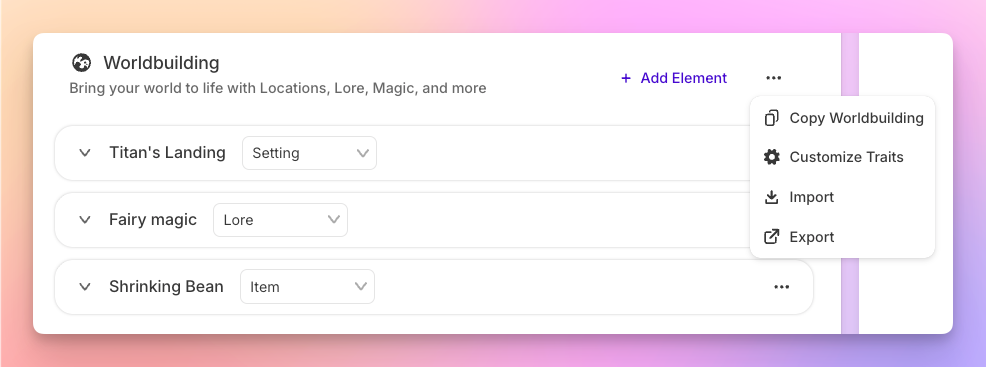
According to Gotham Ghostwriters (2025), 60% of fiction authors who use AI say it improves the quality of their writing, and 87% say it boosts their productivity. The gap widens for series writers specifically, because specialized tools don't just generate text. They maintain the reference layer underneath it. Sudowrite's Worldbuilding cards store magic rules, factions, and geography as discrete entries inside your Story Bible, and those cards travel with every book in your Series Folder.
The Pace Is Real
"The first draft was mine, the bones, the voice, the weird parts. Sudowrite helped me see options I wouldn't have considered. It's like brainstorming with someone who never gets tired."
. Eric, Fiction Author
That kind of output only holds up if continuity holds up with it. Writers using AI report a 57% average productivity boost (Gotham Ghostwriters 2025). But speed without consistency produces series that contradict themselves. Chapter Continuity means the AI reads your last several chapters before generating new prose, so character arcs that shifted in chapter 18 still track in chapter 22.
The Fantasy Genre Punishes Inconsistency Harder Than Any Other
Romance readers forgive a shifted hair color. Fantasy readers build wikis to catch yours. Your magic system, political alliances, and geography form a load-bearing narrative structure. One crack, and readers lose trust.
Sudowrite's Worldbuilding cards let you codify rules ("iron nullifies channeled magic," "the Thornwall Compact dissolved after the Siege of Ashenmere") as permanent Story Bible entries. The Write feature references those cards in real time. Your AI won't accidentally break your own world's physics because the physics live inside the project.
How Series-Wide AI Context Works
Sudowrite handles multi-book fantasy through three connected systems.
Series Folder: One Universe, Many Books
Create a Series Folder and every book inside it shares the same Story Bible. Characters you build in book one, complete with personality traits, physical descriptions, and dialogue style, appear automatically when you're drafting book four. Worldbuilding cards for factions, locations, and magical rules persist across the entire series. You build the encyclopedia once and the AI reads it everywhere.
Worldbuilding Cards: Your Lore's Source of Truth
Each Worldbuilding card represents one discrete element: a magic system, a political faction, a region's geography. Cards hold structured information that the AI references during generation. For a five-book fantasy series, you might have cards for "Runebinding Rules," "The Seven Holds," "Ashenmere Geography," and "Thornwall Compact History." The more granular your cards, the fewer contradictions the AI introduces.
Chapter Continuity: 25 Chapters of Living Memory
Link your documents in sequence and the Write feature reads up to 20,000 words of prior text across 25 linked chapters. The AI doesn't just see the current page. It sees the narrative arc you've been building. Combined with Story Bible data, the Excellent prose mode generates fantasy prose that reads like the same author wrote every chapter.
Setting Up a 5-Book Fantasy Series: Step-by-Step
Here's the walkthrough. Five books. One shared universe. Zero lore contradictions.
Step 1: Create Your Series Folder and Story Bible Foundation
Open Sudowrite and create a new Series Folder. Name it after your series. Inside, create your first book project. Now build the Story Bible: start with the Braindump (dump everything you know about your world), then generate your Synopsis, set your Genre to something specific like "epic fantasy with political intrigue," and define your Style.
Pro tip: The more specific your Genre entry, the better the AI calibrates tone. "Fantasy" is vague. "Epic secondary-world fantasy with unreliable narrators and slow-burn political tension" gives the AI something to work with.
Step 2: Build Character Cards That Evolve Across Books
Create a character card for every POV character and major supporting cast member. Fill in pronouns, personality, background, physical description, and dialogue style. "Speaks in clipped military syntax" produces very different AI output than "rambling academic who never uses one word when twelve will do." Sudowrite stores up to 2,000 characters per Story Bible, which is more than enough for even the most sprawling epic cast.
Step 3: Codify Your Magic System and World Rules
Create individual Worldbuilding cards for each major system: magic rules, political factions, geography, religions, technology level. Be explicit. "Runebinding requires physical contact with inscribed stone. Range is zero. Effects persist for exactly one lunar cycle" beats "magic is rune-based" every time. These cards become the AI's constraints. When you use Write on the Excellent prose mode, it references these cards alongside your narrative text.
Step 4: Link Chapters and Start Drafting
Create documents for each chapter and link them in sequence using Chapter Continuity. As you draft, Write pulls your prior text plus your entire Story Bible. Set your POV and Tense per chapter and let the AI maintain that consistency. Use Guided mode when you need to steer a scene ("Kael discovers the Thornwall treaty was forged") or Auto mode when you want the narrative to flow naturally.
When you start book two, create it inside the same Series Folder. Your Story Bible carries over. Link book two's first chapter to book one's last, and the AI treats your series as one continuous story.
"I honestly worried about the legal stuff before I started using Sudowrite. Turns out, I'm the author , the AI is just a tool I direct. That clarity changed everything for me."
. Joe Vasicek, Published Author
Best Practices for Fantasy Series Lore
Treat Your Worldbuilding Cards Like a Living Wiki
Don't build all your cards in book one and forget them. After major plot events, a faction collapses, a magic rule gets broken, a city falls, update the relevant Worldbuilding card. The AI only knows what you tell it. A card that says "The Seven Holds maintain a fragile alliance" needs updating when book three's civil war shatters that alliance. Sudowrite's Story Bible is editable at any time, and changes propagate to every book in your Series Folder.
Use Claude 3.7 Sonnet for Prose That Carries Weight
The Excellent prose mode is powered by Claude 3.7 Sonnet, and Sudowrite's CX team specifically recommends it for fantasy. The model handles dense worldbuilding exposition without collapsing into info-dumps, and it maintains the improve register that epic fantasy readers expect. Switch to Muse 1.5 for faster first-draft generation, then revise key scenes using Excellent for that polished feel.
Front-Load Your Story Bible Before You Draft
According to the Written Word Media 2025 Indie Author Survey, indie authors who invest in preparation tools see better results. That savings multiplies when your Story Bible is thorough before drafting begins. Spend a full session building cards for every faction, location, and rule system. Use Sudowrite to brainstorm names, places, and political dynamics you haven't considered. The richer your Story Bible at the start, the fewer continuity patches you'll need later.
Common Mistakes That Kill Series Continuity
Treating Each Book as a Separate Project
If your books aren't inside a Series Folder, you're restarting from scratch every time. Each book gets its own empty Story Bible, and the AI has no idea that a character named Kael exists in your universe. Always create a Series Folder first, then add books inside it.
Writing Vague Worldbuilding Cards
A card that says "complex magic system based on elements" gives the AI nothing to enforce. Write rules with specificity: which elements exist, what they can and can't do, what the costs are, who can access them. Vague inputs produce vague outputs.
Ignoring Chapter Continuity Linking
You can write in Sudowrite without linking chapters, but you lose the multi-document context window. Unlinked chapters mean the AI only sees the current document. For a fantasy series where a conversation in chapter 3 foreshadows a betrayal in chapter 19, that lost context means the AI can't maintain the thread. Link every chapter. The two minutes it takes saves hours of continuity repair.
FAQ
How many books can a Sudowrite Series Folder hold?
A Series Folder can contain as many books as your series requires. Each book inside the folder inherits the shared Story Bible, so characters and worldbuilding stay synchronized whether you're writing a trilogy or a twelve-book saga.
Does the AI remember events from earlier books when I'm writing later ones?
Chapter Continuity links up to 25 documents with 20,000 words of active context. Connect your last chapters of book one to the first chapters of book two, and the Write feature treats them as one continuous narrative. Story Bible data persists automatically through the Series Folder.
Which AI model works best for fantasy prose?
The Excellent prose mode (Claude 3.7 Sonnet) is specifically recommended for fantasy by Sudowrite's CX team. It handles dense worldbuilding, improve prose register, and complex multi-character scenes without collapsing into generic-sounding output. Muse 1.5 works well for faster first drafts.
Can I use Sudowrite for hard magic systems with strict rules?
Worldbuilding cards store rules as structured data the AI references during generation. Create a card for each magic system with explicit constraints (costs, limitations, materials required) and the Write feature checks those cards before generating prose. The more specific your rules, the fewer violations you'll need to catch in revision.
How is this different from using ChatGPT for a fantasy series?
ChatGPT resets context with every conversation and has no persistent story memory. You'd need to re-paste your worldbuilding, character sheets, and recent chapters every session. Sudowrite's Series Folder maintains your entire universe permanently, and Chapter Continuity links documents automatically. According to Gotham Ghostwriters (2025), 60% of fiction authors who use AI say it improves the quality of their writing, and 87% say it boosts their productivity.
Do I need to know prompt engineering to use Sudowrite for my series?
No prompt engineering required. Sudowrite's interface is built specifically for fiction workflows. You click Write, choose Auto or Guided mode, and the AI reads your Story Bible, linked chapters, and Worldbuilding cards automatically. The complexity lives in the system, not in your instructions.
Key Takeaways
Fantasy series live or die on lore consistency, and generic AI tools aren't built to maintain a fictional universe across multiple books and hundreds of thousands of words. The right system doesn't just generate prose. It remembers your world.
- Series Folder shares your Story Bible across every book, so characters and worldbuilding stay synchronized from start to finish
- Worldbuilding cards codify magic rules, factions, and geography as structured data the AI references in real time
- Chapter Continuity links 25 documents with reads up to 20,000 words of your story before continuing, treating your series as one continuous story
- Excellent prose mode (Claude 3.7 Sonnet) produces the tonal weight epic fantasy demands
Your world deserves an AI that can hold the whole thing in its head. Start building your series bible and see what writing fantasy feels like when the AI actually remembers book one.