

Table of Contents
You're 40,000 words into your novel. Your detective just discovered the victim's twin sister — a twist you planted in chapter three. You hit "continue" on your AI writing tool, and the output reads like the twin never existed. The detective is suddenly interviewing the victim's brother. Wrong gender, wrong relationship, wrong everything.
That's the dirty secret of most AI writing tools: they don't remember your story. According to a Fiction Writers Survey, 89% of writers using specialized fiction AI tools report better prose quality than general AI, and the reason comes down to one word: context. Sudowrite's Write feature solves this by reading your Story Bible, your preceding chapters, and your outline before generating a single sentence. Here's how context-aware writing with AI actually works, and how to use it without fighting the machine.
In This Guide
- What Is Writing with AI (and Why Context Changes Everything)
- Why Context-Aware AI Writing Matters for Fiction
- How Sudowrite's Write feature Works
- Getting Started: Your First Context-Aware Draft
- Best Practices for Writing with AI That Knows Your Story
- Common Mistakes
- FAQ
- Key Takeaways
TL.DR: Most AI writing tools forget your story between paragraphs, causing character drift and continuity errors. Sudowrite's Write feature remembers up to 20,000 words of your story plus your Story Bible. Characters, worldbuilding, outline, so the AI continues your story instead of inventing a new one. 92% of Sudowrite users report completing manuscripts faster (Sudowrite User Survey).
What Is Writing with AI (and Why Context Changes Everything)?
Writing with AI means using software that generates prose by predicting what comes next in a text, but in fiction, "what comes next" depends entirely on what came before: characters, plot threads, worldbuilding rules, and voice. Without access to that information, AI generates plausible-sounding text that has no relationship to your actual story. Context-aware AI writing partner changes the equation.
Early AI writing tools treated every prompt as a fresh conversation. You'd paste in a paragraph, get output, and hope it aligned with the 60,000 words the AI never saw. The result was character drift, where personalities shifted between paragraphs, and continuity errors that took longer to fix than writing from scratch.
Sudowrite built Write specifically to solve this. The feature reads up to 20,000 words of your preceding text, plus 25 linked chapter documents, plus your Story Bible data (characters, worldbuilding, genre, style, synopsis, and outline). The Muse model. Sudowrite's proprietary fiction-trained AI, processes all of it before writing a word. No prompt engineering required. You click a button and the AI actually knows your story.
Why Context-Aware AI Writing Matters for Fiction
Your AI Forgot Your Protagonist's Name (Again)
You've written 30,000 words of a fantasy novel. Your protagonist lost her left hand in chapter four. You ask a general AI tool to continue a fight scene, and she's gripping a sword with both fists. No memory. No continuity. Random generation wearing a fiction mask.
The Publishing Perspectives Study found fiction writers using AI complete first drafts 40% faster on average, but only when the tool understands what it's continuing. Sudowrite's Write feature pulls from your Story Bible automatically. It knows she lost that hand because you recorded it once, in one place, and the AI reads it every time you hit Write.
1.2 Million Words in a Single Year
"My first year using Sudowrite, I hit 1.2 million words. It helped me stay focused and productive." , Eric, Novel/Fiction Writer
That kind of output isn't about typing speed. According to the Authors Guild Survey, 67% of professional novelists now use AI writing tools, but the gap between "uses AI" and "produces consistent, publishable prose at scale" is enormous. Context-awareness is the bridge. When your AI remembers that chapter twelve's antagonist switched allegiances in chapter eight, you're not burning hours on continuity fixes. You're drafting.
Character Drift Is the Silent Manuscript Killer
Picture this: your romance protagonist is sharp-tongued and guarded in chapter one. By chapter fifteen, the AI has softened her into a generic nice person because it can't see her character card. You don't notice until revision, and now you're rewriting 10,000 words of dialogue.
The Writer's Digest Survey found 73% of fiction writers report AI helps overcome writer's block. But writer's block from a blank page is one problem. Writer's block from an AI that produces garbage you have to delete? That's worse. Sudowrite's POV and Tense settings, combined with character cards in the Story Bible, lock in voice consistency across every Write output. The AI writes your character, not a default one.
How Sudowrite's Write feature Works
Write continues your story from wherever your cursor sits. But the magic is in what it reads before generating.
Step 1: The Context Engine Reads Your World
Before generating anything, Write ingests your preceding text (up to 20,000 words), linked chapter documents (up to 25), Key Details, POV and tense settings, and Story Bible data including genre, style, synopsis, and outline summaries. Sudowrite's Muse 1.5 model processes this as a single coherent context window. Your villain's motivation, your magic system's rules, your protagonist's speech patterns, all loaded before the first word appears.
Step 2: You Choose Your Mode
Auto continues naturally from your last sentence. Best for flow state, you write, then let the AI keep going. Guided reads 1,000 words around your cursor and generates three direction options, or you type your own instruction ("have the witness lie about the alibi"). Tone Shift adjusts style to one of eight presets. Ominous, Romantic, Fast-Paced, and five others, while maintaining full context awareness.
Step 3: You Pick, Edit, and Keep Writing
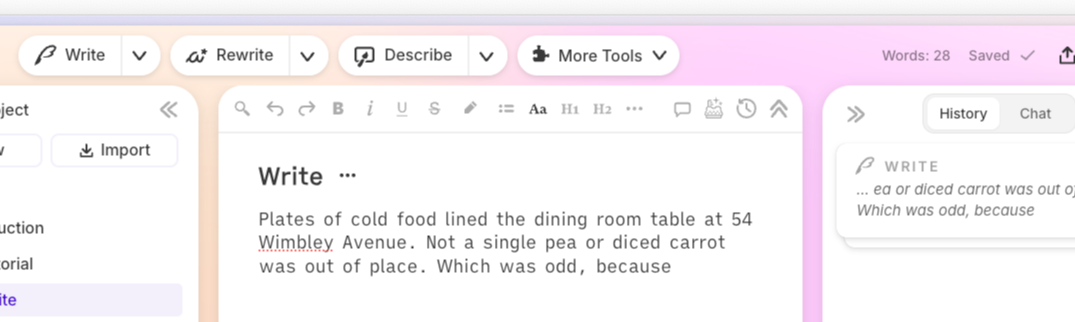
Write generates between 1 and 6 variations (you choose how many). Each card runs 50 to 1,500 words. AI-generated text appears in purple until you edit it. Leave a sentence unfinished and the AI picks it up mid-thought, a trick that produces noticeably more natural continuations.
| Feature | Sudowrite Write | ChatGPT |
|---|---|---|
| Story context window | 20,000 words + 25 linked chapters | ~3,000–8,000 words per conversation |
| Character/world memory | Story Bible (persistent, structured) | None (manual re-pasting each session) |
| Outline awareness | Reads synopsis + outline summaries | No built-in outline integration |
| Fiction-specific model | Muse 1.5 (trained on fiction) | General-purpose model |
| POV/tense enforcement | Automatic per settings | Manual prompt instruction |
| Multiple continuations | 1–6 variations per generation | 1 per response |
Getting Started: Your First Context-Aware Draft
Step 1: Build Your Story Bible First
What you'll accomplish: Give the AI everything it needs to write your story accurately.
Start with Braindump, dump everything you know about your story. Then work through Synopsis, Genre, Characters, and Worldbuilding. Each character card holds pronouns, personality, background, physical description, and dialogue style. You don't need all of this finished to start writing, but the more your Story Bible contains, the smarter Write becomes.
Pro tip: A specific genre description like "cozy mystery with amateur sleuth" produces better results than just "mystery."
Step 2: Write at Least 20 Words, Then Hit Write
What you'll accomplish: Generate your first context-aware continuation.
Write needs at least 20 words in the document. More is better. Paste in an existing chapter or start fresh. Then place your cursor where you want the AI to continue and click Write. Start with Auto mode. Leave your last sentence unfinished for the most natural pickup.
Step 3: Try Guided Mode for Plot Control
What you'll accomplish: Steer the AI toward specific story beats.
Switch to Guided when you know what should happen next but don't want to write it cold. Type an instruction like "Elena confronts Marcus about the missing files, but he deflects with charm." Write generates three options based on your direction plus your full story context.
Step 4: Link Your Chapters for Long-Form Continuity
What you'll accomplish: Give Write memory across your entire manuscript.
Link your chapter documents in order. Write can read up to 25 linked documents. That's the previous 20,000 words of your novel feeding into every generation. For series writers, Series Folder shares Story Bible information across multiple books.
"I've been able to go from taking six months to a couple of years to write a novel… to about one or two months." , Joe Vasicek, Fiction Author (Author of Genesis Earth)
Best Practices for Writing with AI That Knows Your Story
Fill your character cards before drafting. Write reads character data every time it generates. A card with personality traits, speech patterns, and physical description prevents the AI from defaulting to generic voices. Spend 15 minutes per major character upfront. Save hours of revision later.
Use the Creativity slider intentionally. Default (middle setting) works for most scenes. Crank it up for brainstorming-style first drafts where you want surprising turns. Pull it down for scenes that need to stay tightly on-plot. Matching the slider to your scene's purpose eliminates "that's weird" moments in output.
Don't over-edit before moving forward. AI-generated text shows in purple. Resist the urge to polish every sentence before generating the next section. Draft forward, revise backward. The Alliance of Independent Authors Report found AI-assisted editing reduces revision time by 35%, but only if you let the drafting phase stay messy.
Common Mistakes
Skipping the Story Bible Entirely
Most writers jumping into Write for the first time skip the Story Bible because they want to write now. The problem: Write without Story Bible data is just a fancier autocomplete. You're leaving the biggest context advantage on the table. Even a bare-minimum Synopsis and two character cards dramatically improve output quality.
Feeding the AI Finished Prose and Expecting Matching Quality
Write generates draft-quality text. First drafts, not final drafts. Writers who expect publication-ready prose from a single click get frustrated and quit. Use Write to move forward fast, then come back with Rewrite to polish. That's the workflow, velocity first, craft second.
Ignoring Chapter Linking
Writing each chapter as an unlinked document means Write only sees the current file. By chapter ten, the AI has zero memory of chapters one through nine. Link your documents. Five minutes of setup gives Write access to 25 chapters of context.
FAQ
What does "AI writing partner" mean for fiction specifically?
AI writing partner for fiction refers to AI tools that generate narrative prose. Dialogue, description, scene continuity, rather than marketing copy or academic text. Sudowrite's Muse model is trained specifically on fiction storytelling, which produces output that reads like a novelist wrote it rather than a chatbot.
How much of my story can Sudowrite's Write feature actually read?
Write processes up to 20,000 words of preceding text plus content from up to 25 linked chapter documents, combined with your full Story Bible data. That includes characters, worldbuilding, genre, style, synopsis, and outline summaries, loaded automatically every time you generate.
Can I control what the AI writes next?
Guided mode lets you type specific instructions for what should happen in the next scene. You can write direction like "the suspect breaks down and confesses, but reveals a second crime" and Write generates options matching that beat while staying consistent with your characters.
Does Write work for series across multiple books?
Series Folder shares Story Bible information across books, and Chapter Continuity links up to 25 documents. For fantasy or romance series writers managing complex timelines, this means the AI remembers book-one worldbuilding rules while drafting book three.
How is Sudowrite different from using ChatGPT for fiction?
ChatGPT has no persistent story memory, no Story Bible, and no fiction-specific model. You'd need to re-paste context every session, manually enforce POV and tense, and accept output from a general-purpose model not trained on narrative craft. Sudowrite handles all of this automatically.
Do I need to learn prompt engineering?
No. Sudowrite's interface is built for fiction workflows. You click Write, choose a mode, and the context engine does the rest. The 89% of writers who report improved prose quality with specialized fiction AI tools over general AI (Fiction Writers Survey) aren't prompt engineers. They're novelists using a tool designed for novelists.
Key Takeaways
Context-awareness isn't a nice-to-have feature. It's the difference between an AI that writes your story and one that writes a story.
- Sudowrite's Write feature reads 20,000+ words of context plus your entire Story Bible before generating. Eliminating character drift and continuity errors
- Auto, Guided, and Tone Shift modes give you control over how much direction the AI needs
- Story Bible + Chapter Continuity means the AI's memory scales with your manuscript, not against it
- 92% of Sudowrite users complete manuscripts faster, and users save an average of 15 hours per week on revision (Sudowrite Internal Data)
Your story already lives in your head. Give the AI the same information, and it stops guessing and starts collaborating.
Related Reading
Other craft-focused Sudowrite guides:
- Story Bible Template: How to Build One with Sudowritethe foundation every feature in this guide depends on
- How to Write a Book Series Without Losing Track. Series Folder and cross-book continuity for multi-installment projects
- Best AI Writing Tool for Series Writers. Sudowrite vs. Scrivener + ChatGPT for writers building multi-book projects
- Co-Writing with AI: How Sudowrite Helps Without Taking Over Your Voicestaying in control of your creative process as you scale with AI