

Table of Contents
You've written the scene. The plot beats are there. Your characters say the right things and go to the right places. But when you read it back, it feels like someone vacuumed the air out of the room. Thin. Rushed. A skeleton wearing a story costume.
You're not alone. According to the Fiction Writers Survey, 89% of writers using specialized fiction AI tools report improved prose quality compared to general AI — because the real problem isn't talent. The problem is that adding texture by hand, scene after scene, across 80,000 words, is brutal. Sudowrite's Expand was built for exactly this: turning flat prose into writing that breathes, without padding your word count with filler. Here you'll learn what makes scenes feel thin, how to write longer scenes with genuine richness, and when Expand is the right tool versus when it's not.
In This Guide
- What Makes a Scene Feel Thin?
- Why Writing Longer Scenes Matters
- How Expand Turns Thin Prose Into Textured Writing
- Getting Started with Sudowrite's Expand
- Best Practices for Expanding Scenes
- Common Mistakes When Lengthening Scenes
- FAQ
- Key Takeaways
TL.DR: Thin scenes happen when writers nail plot beats but skip sensory grounding, internal thought, and atmosphere. The fix isn't adding words, it's adding texture. Sudowrite's Expand takes 3 to 1,000 words of highlighted text and enriches it using your Story Bible's genre, character, and style settings, so the expanded prose sounds like you wrote it on your best day.
What Makes a Scene Feel Thin?
A thin scene is one where the reader can follow what happens but can't feel what it's like to be there. The plot mechanics work. Character enters, conflict occurs, character reacts, but the writing reads like a summary rather than an experience. Thin scenes lack sensory grounding (what the room smells like, how the chair creaks), internal thought (what the character dreads or wants), and atmosphere (the weight of silence, the quality of light). The events are present. The texture is missing.
Most writers don't produce thin scenes because they lack skill. They produce them because first drafts are about getting the story down, and texture is what revision adds. The problem is that manual revision is exhausting. The Alliance of Independent Authors reports that AI-assisted editing reduces revision time by 35%, and that number climbs when the AI actually understands fiction conventions.
Sudowrite's Expand addresses this directly. You highlight between 3 and 1,000 words of thin prose, and Expand enriches them by reading the surrounding text. Both before and after your selection. Plus your Story Bible data, including genre, characters, and style settings. The result isn't random description bolted onto your sentences. The expanded text reflects your world, your character's voice, and your story's tone.
Why Knowing How to Write Longer Scenes Matters
Your Readers Can't Feel What They Can't Sense
You've written "She walked into the bar and it was busy." Technically accurate. Emotionally dead. Your reader's brain has nothing to build a picture from, no sound, no smell, no physical sensation. Thin scenes force readers into spectator mode when they should be immersed. The Writer's Digest Survey found that 73% of fiction writers report AI helps overcome writer's block, but the deeper issue isn't blocks. It's the energy it takes to layer in sensory detail paragraph after paragraph across a full manuscript. Sudowrite's Describe feature generates five-sense descriptions, and Expand applies that same principle at the passage level, weaving in the sensory grounding your draft is missing.
Thin Prose Signals Amateur Writing to Agents and Readers
According to Publishing Perspectives, fiction writers using AI complete first drafts 40% faster on average. Speed matters. But a fast draft full of stage-direction prose, "He sat. She spoke. They left.", won't survive a query letter or a reader's first-chapter test. Longer, richer scenes signal craft. They tell an agent you understand pacing, atmosphere, and interiority. The difference between a rejection and a request for the full manuscript often lives in the texture of your first ten pages.
"One of the best features of Sudowrite is how it gives you alternatives for phrasing, which helps avoid the repetition that often creeps into long-form writing." , Francisco, Fiction Writer and Dungeon Master
Word Count Requirements Aren't Just Vanity
You're writing a fantasy novel and your scenes clock in at 1,200 words each. Your genre expects 3,000 to 5,000. You don't need padding. You need the internal monologues, the environmental details, the beat-by-beat tension that your outline skipped. Genre conventions exist because readers expect a certain depth of experience. Sudowrite's Expand doesn't inflate your scenes with filler. It reads your Story Bible's genre and style settings and generates the kind of texture your genre's readers are specifically looking for.
How Expand Turns Thin Prose Into Textured Writing
Expand isn't a word-count inflator. It reads context on both sides of your selection plus your Story Bible, and produces prose that belongs in your manuscript. Here's how it works in practice.
Step 1: Highlight the Thin Passage
Select anywhere from 3 to 1,000 words that feel skeletal. A single summary sentence works. So does an entire paragraph that reads like a plot outline. Expand reads the text surrounding your selection to understand what's happening in the scene.
Step 2: Expand Uses Your Story Bible for Voice Matching
Here's what separates Expand from generic AI padding. Expand pulls your Story Bible data, genre conventions, character details, worldbuilding rules, and style settings. If you've defined your prose as "sparse literary noir," the expansion won't produce flowery fantasy description. Your voice stays intact because Expand knows your story's DNA.
Step 3: Review, Edit, and Keep What Works
Expand generates richer prose from your selection. You keep what fits, edit what almost fits, and discard what doesn't. The expanded text appears in the editor for you to shape, you're still the author, just with a collaborator who understands your story.
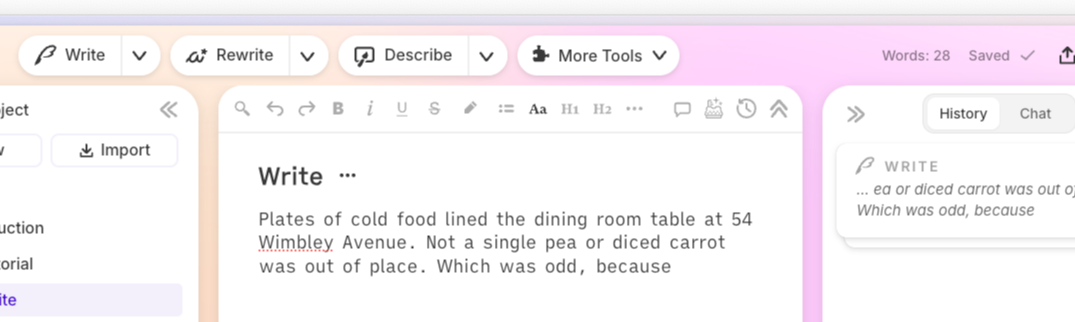
Before Expand:
Marcus entered the tavern. It was crowded and loud. He ordered a drink and waited for his contact.
After Expand:
Marcus shouldered through the tavern door into a wall of heat and noise. Pipe smoke tangled with the smell of spilled ale and something charred, and the floorboards groaned under a hundred shifting boots. He flagged down the barkeep, wrapped his fingers around a cold tankard, and found a corner where the shadows pooled deepest. His contact was late. His hand hadn't stopped shaking since the bridge.
The plot events are identical. But the second version has sensory grounding (smell, sound, touch), atmosphere (shadows, groaning floorboards), and internal tension (shaking hand). That's texture, not filler.
Getting Started with Sudowrite's Expand
Step 1: Set Up Your Story Bible
Before you touch Expand, fill in your Story Bible's genre and style sections. Expand reads this data to match its output to your voice. Be specific. "dark urban fantasy with dry humor" produces better results than just "fantasy." Add character details too, since Expand uses them when your characters appear in the selected text.
Step 2: Identify Your Thin Passages
Read through your draft and flag anywhere the prose feels like a summary. Scenes where characters move from A to B without sensory detail. Transitions that read like screenplay directions. Emotional beats told in one sentence that deserve a full paragraph.
Step 3: Highlight and Expand
Select your thin passage (3 to 1,000 words), then click Expand. The tool reads context before and after your selection plus your Story Bible settings and generates a richer version. Review the output, keep the lines that fit your voice, and edit anything that needs adjustment.
Step 4: Pair Expand with Rewrite and Describe
Expand gives you more prose. Sudowrite's rewrite options. Show Not Tell, More Inner Conflict, More Descriptive, let you refine what Expand produces. Describe generates targeted five-sense details for specific words or phrases. Use all three together during revision for the deepest results.
Best Practices for Expanding Scenes
Start with your weakest scenes, not your strongest. Your best writing probably doesn't need Expand. Your rushed transitions, your "placeholder" paragraphs, your end-of-chapter scenes where you ran out of steam, that's where Expand earns its keep. Target the passages you'd normally dread revising by hand.
Feed Expand better raw material and you'll get better output. A selection that says "They fought" gives Expand almost nothing to work with. "Elena blocked his strike but her shoulder screamed from the last round" gives Expand character, physical stakes, and emotional context. Sudowrite's Muse model responds to specificity the way any good collaborator does, more input, richer output.
Know when NOT to expand. Fast-paced action scenes, punchy dialogue exchanges, and deliberate white space earn their brevity. Not every passage needs more words. If a scene feels thin because the prose is sparse, Expand helps. If it feels thin because the plot beat is weak, Expand just adds decoration to a broken foundation. Fix the story problem first.
Common Mistakes When Lengthening Scenes
Confusing Length with Quality
More words aren't automatically better. A 5,000-word scene full of redundant description reads worse than a tight 2,000-word scene with precise detail. Expand adds texture, but you still need to edit the output. Cut any expansion that repeats information the reader already has.
Ignoring Your Story Bible Settings
Expand's voice matching depends on your Story Bible. If your genre and style fields are empty, Expand works with less context and the output becomes more generic. Spending ten minutes on your Story Bible settings saves hours of editing expanded passages that don't match your voice.
Expanding Everything at Once
Don't highlight your entire chapter and hit Expand. Work in passages, a paragraph, a transition, a single summary sentence. Smaller selections give Expand more focused context and produce more usable results. Sudowrite reads up to 1,000 words per selection for a reason.
FAQ
What does "how to write longer scenes" actually mean in fiction?
Learning how to write longer scenes means adding depth. Sensory detail, internal thought, and atmosphere. Not inflating word count. A longer scene should make the reader experience the story more fully, not just read more words. Sudowrite's Expand specifically targets this kind of enrichment rather than generic padding.
How does Sudowrite's Expand preserve my writing voice?
Expand reads your Story Bible's genre, style, and character settings before generating any text. If you've defined your voice as "terse literary noir," the expansion won't read like epic fantasy. The more detail you put into your Story Bible, the closer the output matches your natural prose style.
When should I use Expand versus Rewrite?
Use Expand when a passage needs more content, more sensory detail, more internal thought, more atmospheric grounding. Use Rewrite when the content is there but needs different execution. Rewrite's Show Not Tell mode, for example, transforms existing telling into showing without adding length.
Can Expand make my scenes worse by adding filler?
Any expansion tool can produce filler if used carelessly. The key is editing the output. Expand's advantage over generic AI is context awareness. It reads surrounding text and Story Bible data to generate relevant texture. But you're still the final judge of what belongs in your story.
How many words can I expand at once?
Expand accepts selections between 3 and 1,000 words. Smaller selections (a sentence or short paragraph) tend to produce the most focused results. Larger selections work well for passages that need general enrichment across multiple beats.
Is expanding scenes the same as padding word count?
No, and the distinction matters. Padding repeats information or adds meaningless description. Genuine expansion layers in sensory grounding, emotional interiority, and atmospheric detail that deepen the reader's experience. Data from Sudowrite shows that 92% of users report completing manuscripts faster, partly because Expand handles the texture work that slows manual revision to a crawl.
Key Takeaways
Understanding how to write longer scenes isn't about hitting a word count. It's about filling your prose with the sensory, emotional, and atmospheric texture that makes readers feel like they're standing inside your story.
- Thin scenes happen to everyone. First drafts prioritize plot over texture, and that's fine
- Sudowrite's Expand enriches passages using your Story Bible settingsso expanded text matches your voice, genre, and characters
- Texture means sensory grounding, internal thought, and atmosphere. Not redundant description or filler
- Pair Expand with Describe and Rewrite for a complete revision workflow that cuts manual editing time dramatically
Your scenes have the bones. Now give them breath.
Related Reading
Other craft-focused Sudowrite guides:
- Story Bible Template: How to Build One with Sudowritethe foundation every feature in this guide depends on
- How to Write a Book Series Without Losing Track. Series Folder and cross-book continuity for multi-installment projects
- Best AI Writing Tool for Series Writers. Sudowrite vs. Scrivener + ChatGPT for writers building multi-book projects
- Co-Writing with AI: How Sudowrite Helps Without Taking Over Your Voicestaying in control of your creative process as you scale with AI