

Table of Contents
The four-book-a-year indie author isn't typing faster than you. She's running a stack. Brainstorm in the morning to crack the scene. Write to draft the prose. Rewrite to fix the parts that landed flat. Story Bible holds the world steady across 320,000 words of series fiction. That's the workflow. Not magic, not "AI did it all," just a tight daily loop most writers haven't built yet.
This is what that stack actually looks like inside Sudowrite. The features prolific authors lean on, the model rotation by genre, and three real-shaped case studies you can copy.
The Daily Loop: Brainstorm, Write, Rewrite
Most working novelists who hit four-plus books a year follow a similar rhythm. Not because they read the same productivity book. Because the loop just works when you're staring at a blank chapter at 6:47 AM with a kid waking up in twenty minutes.
The loop has three moves. Brainstorm to break the logjam. Write to put prose on the page. Rewrite to fix what's there.
Step 1: Brainstorm cracks the scene open
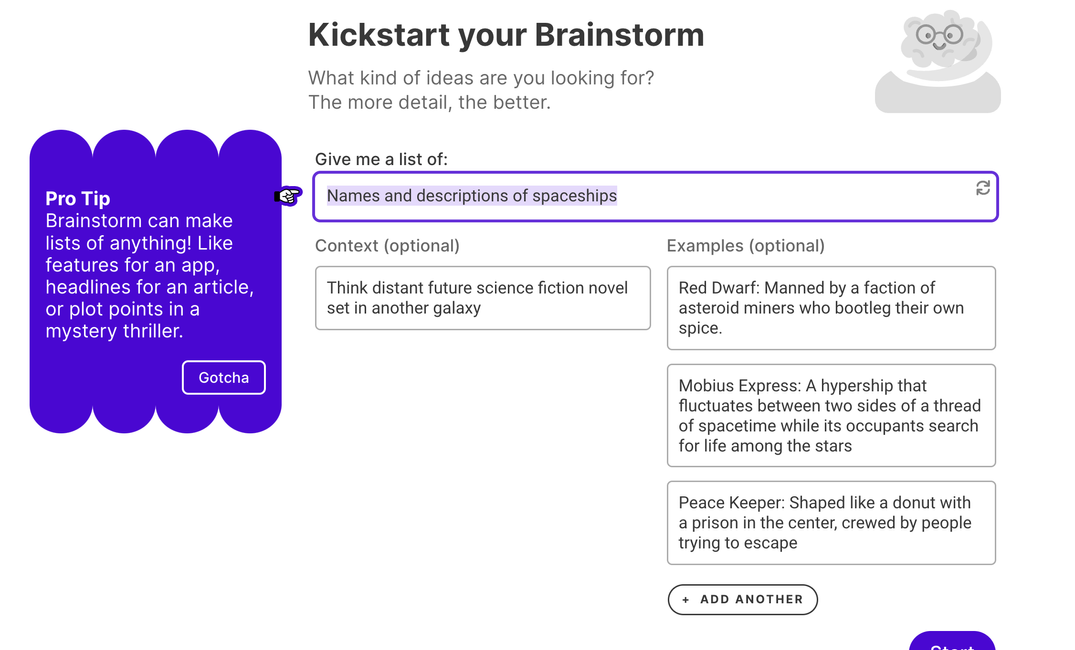
Brainstorm is the warm-up. You don't open the day's chapter cold. You ask Sudowrite to throw fifteen options at you: ways the dinner argument could detonate, things the assassin might find in the dead lord's chambers, opening lines for the chapter where your FMC finally tells her best friend she's been lying for three books. You're not picking one. You're letting the bad ideas surface the good one.
One romance author working in romantasy uses Brainstorm specifically for tension entry points. She'll feed in the scene goal ("first kiss after the cave argument") and ask for ten beats that could trigger it. Two of the ten will spark. She uses one, modifies another, throws out the rest.
Step 2: Write puts words on the page
Write has two modes that matter for the daily loop. Auto follows the story you've built. Drop your cursor at the end of a paragraph, hit Write, and it continues based on what's already on the page plus your Story Bible. Useful for momentum scenes where you know what happens but don't want to type every transition.
Guided is the workhorse. You tell Write what should happen next ("she finds the letter, reads it standing, drops to her knees, doesn't cry") and it drafts in your voice. Most prolific authors use Guided for 60-70% of their drafting because they want steering without typing every word.
The trick veterans use: Write 300 words. Read them. If the voice is off, regenerate. If it's close but off, keep the good parts and Guided-write the rest.
Step 3: Rewrite kills the flat sentences
Rewrite is where the manuscript starts to feel like yours. Highlight a paragraph that reads stiff. Pick a mode. Show Don't Tell turns "she was nervous" into the actual bouncing knee and the dry mouth. More Inner Conflict layers her doubt into the action. Longer expands. Shorter compresses. Customize lets you type your own direction ("make this sound like Abercrombie at his bleakest").
An urban fantasy author who ships a novella every six weeks runs every scene through Rewrite at least twice. First pass: Show Don't Tell on any paragraph with a tell verb. Second pass: Customize with "punchier, more sensory, cut anything that doesn't earn its place." That's her revision pass.
Model Rotation: The CX Prose-Modes Matrix
This is the part most new Sudowrite users miss. There isn't one model. There are several, and they're tuned for different genres. The CX prose-modes matrix is the cheat sheet for which model to run for which book.
Here's the working version most prolific authors follow:
- Muse: Romance, erotica, horror, thriller. Muse is Sudowrite's fiction-trained model and the only one in the stack that won't refuse explicit or dark content. Steamy scenes, gore, on-page violence, dub-con, body horror, panic attacks. Muse writes them straight.
- Claude 3.7 Sonnet: Fantasy, mystery, YA. Strong at clean prose, dialogue rhythm, and twist payoff. Solid for cozy fantasy, traditional whodunits, contemporary YA.
- Claude 3 Opus: Literary, historical, sci-fi. Longer sentences, more layered subtext, better at period voice and hard-SF concept density.
- Deepseek-R1: Adventure, crime. Pace-driven, tight, good for procedural beats and chase sequences.
- GPT-4o Mini: Non-fiction. Useful for memoir, essay, the occasional research dump. Not your main fiction driver.
Working authors rotate. A romantasy writer might draft the spicy chapters in Muse and the political intrigue chapters in Claude 3.7 Sonnet. A thriller author drafts the action in Deepseek-R1 and the slow-burn confession scenes in Muse. You're not locked in. Each prose card can target a different model.
The Creativity Dial matters more than you think
Inside any model, the Creativity Dial runs 0 to 10. Most authors live between 4 and 7. Push to 8-9 when you need a wild metaphor or a scene that breaks expectation. Drop to 2-3 when you're drafting a clean transitional beat that needs to do its job and get out of the way.
One litfic author keeps her dial at 6 for prose and drops to 3 specifically for dialogue tags and action beats. She wants surprise in the imagery, not in the choreography.
Story Bible Is the Spine
Here's what separates "I dabble with AI" from "I ship four books a year." The dabblers run Sudowrite scene by scene with no memory. The prolific authors build out Story Bible before they write the first chapter, and they keep it updated as the book grows.
Story Bible holds six things:
- Characters: voice samples, personality, physical details, evolving traits. Your FMC's voice in Book 3 should not match Book 1 if she's grown. The card updates.
- Worldbuilding: Rules of magic, Lore, Factions, Settings, Items. Sanderson's hard-magic logic lives here. So does the smell of your protagonist's apartment.
- Style: Voice samples, prose preferences, the stuff that makes your sentences yours.
- Outline: Chapter-by-chapter plan. Or beat sheet, if you're a Save the Cat writer.
- Synopsis: The pitch-version summary that grounds every generation.
- Braindump: The mess. Notes, throwaway ideas, "what if the antagonist is actually her sister" that you'll come back to.
When you hit Write, Sudowrite reads Story Bible and threads it through the prose. Your FMC sounds like your FMC. Her enemy uses the slang you wrote into his card. The magic system obeys its own rules. This is why the AI doesn't go off the rails on chapter 14.
Series Folder for the long game
Prolific romance and fantasy authors don't write standalones. They write series. Series Folder shares Story Bible across multiple books, which means the world rules, the character histories, the recurring side characters all stay consistent from Book 1 to Book 6.
This is the feature that turns Sudowrite from a writing tool into a series production engine. When you start Book 4, you don't re-input the world. You open the Series Folder, create a new project inside it, and your full bible is already loaded.
Chapter Continuity Catches What You'd Miss at 11 PM
You wrote Chapter 2 in February. It's now October and you're on Chapter 19. You don't remember if you said the dagger had a ruby pommel or an emerald one. Chapter Continuity does. Run it after a draft chapter is complete and it flags contradictions against your earlier chapters and Story Bible.
One epic fantasy author who runs a six-book series uses Chapter Continuity as her final pre-edit pass. Last book it caught that she'd changed her city's river name halfway through. Saved her readers from one of those one-star "lazy author" reviews.
Three Author Stacks
The features matter less than how authors string them together. Here are three real-shaped workflows.
Stack 1: The Romantasy Author (5 books per year)
Genre: Romantasy, spicy. Think Maas-adjacent with darker edges.
Daily session: 2 hours, 5 AM to 7 AM before her kids wake up. Target output: 2,500 words.
Model: Muse for everything. Won't refuse the spicy scenes, handles dark themes (her FMC has trauma), and the prose hits the genre conventions her readers expect.
Creativity Dial: 7 for prose. 5 for dialogue.
Stack:
- Opens Sudowrite, reads her outline card for today's chapter.
- Brainstorm: 10 ways the chapter opening could land. Picks one.
- Guided Write the opening 400 words. Reads. Likes 70% of it. Regenerates the rest with tighter direction.
- Drafts the chapter middle in 500-word chunks. Auto Write where the momentum is good, Guided where she needs to steer.
- Hits the steamy scene. Switches Brainstorm to "tension beats." Pulls three. Writes the scene in Guided with Muse cranking out the heat.
- End of chapter, runs Tone Shift on a flat paragraph. Sensual. Better.
- Closes the session with Chapter Continuity. Two flags. Fixes one, ignores the other.
Series Folder: Yes. She's on Book 4 of a planned 7. The fae court politics stay consistent because the world cards travel with her.
Stack 2: The Thriller Author (4 books per year)
Genre: Psychological thriller. Domestic suspense with twists.
Daily session: 3 hours, evenings after the day job. Target: 2,000 words.
Model: Muse for the dark interior scenes (his protagonists have ugly thoughts). Deepseek-R1 for the chase and procedural beats. He swaps mid-chapter when the scene type changes.
Creativity Dial: 5 across the board. He wants reliable, not wild.
Stack:
- Reviews his beat sheet in the Outline card. He's a hard outliner.
- Drafts the scene in Guided Write. Muse for the interior, Deepseek-R1 for action.
- Highlights any paragraph that reads expository. Rewrite with Show Don't Tell.
- Highlights any dialogue beat that sounds wooden. Rewrite with Customize: "more clipped, more tension, characters interrupting each other."
- At the chapter's end-of-chapter twist, he runs Brainstorm for three alternative reveals. Picks the one that surprised him.
- Uses Chat to ask "does my FMC's reaction feel earned given her backstory in Chapter 4?" Chat reads her Story Bible card and answers honestly. Sometimes the answer is no, and he rewrites.
Plugins: He runs a custom plugin built with the Plugin Builder that injects his Characters card and asks for "three lines of dialogue this character would say in this emotional state." Saves him 20 minutes per chapter.
Stack 3: The Cozy Fantasy Author (6 novellas per year)
Genre: Cozy fantasy. Tea-shop owners, low-stakes mysteries, found family.
Daily session: 90 minutes, midday. Target: 1,800 words.
Model: Claude 3.7 Sonnet. The CX matrix calls for it on cozy fantasy and she agrees. The prose lands warm, the dialogue feels natural, and she doesn't need Muse's edge.
Creativity Dial: 6 for prose, 7 for the magical descriptions. She wants the magic to feel unexpected.
Stack:
- Opens the project, reads the Synopsis card to re-center.
- Uses Describe heavily. Every new setting gets a Describe pass for the five senses. The smell of cardamom in the tea shop, the creak of the wooden floor, the way the morning light hits the herb jars.
- Guided Write the scene in 400-word chunks.
- Expand on any scene that runs too short. She likes lingering. Expand stretches the moment without padding.
- Rewrite with Longer mode on any paragraph that feels rushed.
- Runs Tone Shift to Fantastical on the magic moments. Subtle, but adds the right shimmer.
Mobile App: She drafts on the train using the mobile app. Same Story Bible, same models, smaller screen. Words still count.
Sprint Metrics That Actually Matter
The prolific authors track three numbers, not ten.
- Daily word count. Not a vanity metric. Their goal is a draft that ships, and word count is the metronome.
- Session length. Most cap at 90-180 minutes. After that, the prose degrades faster than the page count grows.
- Revision passes per chapter. Two Rewrite passes per scene is typical. Three is a warning sign that the scene needs structural work, not prose polish.
What they don't track: how many AI tokens they used, how many regenerations they ran, how "much of the book is AI." Those are journalist questions. The book is theirs. The tool helped them ship.
Plugins and Custom Workflows
The Plugin Builder is where the workflow nerds live. You can build a plugin that injects your Story Bible variables into a custom prompt and reuse it every chapter. A few patterns prolific authors actually run:
- Voice Check: Inject the Character card and your last 500 words, ask "does this sound like her?" Returns a yes/no with three lines of evidence.
- Beat Sheet Generator: Inject the Synopsis and Outline, ask for the Save the Cat beats for the next chapter.
- Tension Map: Inject the chapter, ask where the tension dips. Useful for pacing audits.
- Genre Convention Check: Inject the chapter and a genre profile, ask which expected beats are missing. Romance writers use this for the meet-cute, the first kiss, the dark moment.
The community shares plugins. You don't have to build from scratch.
Canvas for Planners
If you're a plotter, Canvas is the visual workspace where the chapter cards live on a board. Drag, reorder, link. Mystery writers map their red herrings here. Romance writers track the emotional beats across the relationship arc. Fantasy writers chart the magic system's escalation chapter by chapter.
The plotters love it. The pantsers ignore it. Both ship books.
POV and Tense per Chapter
If your book runs multiple POVs (most epic fantasy and romantasy does), set the POV and Tense per chapter. Sudowrite respects it. Your dark fae prince's chapters draft in third-limited past. Your modern romance's chapters draft in first-present. No more mid-paragraph tense slips.
The Stack Is the Difference
The authors hitting four-plus books a year aren't doing anything you can't. They built a daily loop. They chose the right model for their genre. They invested an afternoon in Story Bible setup before drafting the first chapter. They use Brainstorm to break logjams instead of staring at the page. They use Rewrite as a craft pass, not a fix-it pass.
The tool is the same. The stack is the difference.
If you've been using Sudowrite scene by scene without Story Bible, switching models, or running a real loop, you're using maybe 30% of what's on the table. Try Sudowrite free, build out one project the way these authors do, and see what changes when the whole stack is running.