

Table of Contents
Your best scene idea won't wait for your laptop. It hits at the grocery store checkout, in the school pickup line, three stops into a subway ride. Sudowrite's mobile app puts the full novel-writing toolkit in your pocket. Muse, Story Bible, all 20+ prose modes, Write Auto and Guided. Not a stripped-down note-taker. The actual app.
Fiction writers used to lose those moments. You'd open Notes, type a fragment, then forget what triggered it by the time you got home. Or worse, you'd remember the trigger but lose the voice. Mobile writing changes the math. When your novel lives where your thumbs can reach, your daily word count stops depending on whether you found a free hour at a desk.
Why Mobile Writing Matters for Fiction
The fastest-growing writer behavior right now is writing on a phone. Not journaling. Not scrolling Reddit for craft tips. Actually drafting fiction. Romance authors have led this shift for years. Wattpad writers basically built careers on it. Now the rest of the field is catching up, partly because life keeps stealing the long writing blocks we used to count on.
Here's the thing nobody admits at writing conferences: the people hitting 5,000 words a day aren't always sitting in a cabin. A lot of them are writing in 15-minute chunks. Waiting for coffee. Lunch break. Kid's soccer practice. Those chunks add up to chapters if your tool stops fighting you.
The problem has always been friction. Mobile word processors strip features. Cloud sync breaks. You can't see your character notes without switching apps four times. By the time you've found your Worldbuilding card for the magic system, your toddler needs juice and the moment is dead.
Sudowrite's mobile app solves the friction problem by not being a different app. It's the same Sudowrite. Same Story Bible. Same Muse. Same Write button. Your laptop session and your phone session are looking at the exact same project.
What's Actually on Mobile
Let's be specific about what you get, because vague feature lists are useless for fiction writers trying to decide if a tool can carry real work.
The mobile app includes:
- Write in both Auto and Guided modes. Tap the button, get prose continuation that follows your story or matches your specific direction.
- All 20+ prose modes, including Muse (the fiction-trained model that won't refuse your dark romance or horror), Claude 3.7 Sonnet for fantasy and mystery, Claude 3 Opus for literary and historical, Deepseek-R1 for adventure and crime, and GPT-4o Mini when you're working on non-fiction.
- Story Bible access. Read and edit Characters, Worldbuilding, Style, Outline, Synopsis, and Braindump from your phone.
- Rewrite with all the standard modes: Show Don't Tell, Customize, More Inner Conflict, Longer, Shorter.
- Describe for five-sense sensory expansion when you're stuck on what the kitchen smells like.
- Expand to stretch a thin scene without rewriting it from scratch.
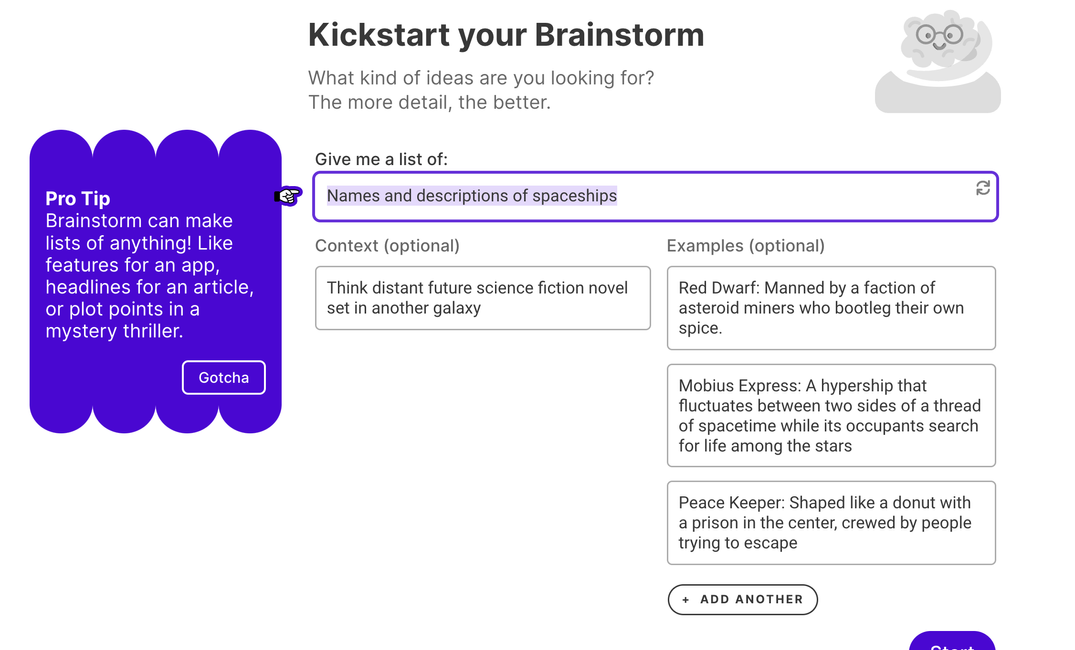
- Brainstorm for character names, plot turns, dialogue options.
- Chat, which reads your Story Bible and gives feedback that actually knows your project.
- Tone Shift for adjusting pacing and mood (Ominous, Sensual, Fantastical, Fast-Paced, Romantic, Authoritative, Conflicted).
- Creativity Dial from 0 (safe) to 10 (chaotic), in case you want Muse to take bigger swings on a particular scene.
What's not on mobile? Mostly the things you wouldn't want to do on a phone anyway. Canvas, the visual story-planning workspace, is a screen-real-estate feature. You'll want a tablet or laptop for that one. Plugin Builder is also better on a larger display. But Plugins themselves work fine on mobile, so the custom ones you've already built (or installed from the community) come along for the ride.
The Real Mobile Writing Workflow
Let me walk through what an actual session looks like, because feature lists don't capture the rhythm.
You're on a 40-minute commute. You're 60,000 words into a romantasy. Your hero is about to confront the villain in chapter 22, but you haven't decided whether she shows up alone or brings her court mage. Yesterday at your desk, you wrote yourself a note in the Outline section of Story Bible: "Ch 22 - decide if Vera brings Aldric." That note is right there when you open the app on the train.
You tap into the chapter. Scroll to where you left off. The last sentence reads: The throne room doors loomed twenty paces ahead, and she could already feel the cold weight of his attention through the wood.
You highlight that sentence and tap Chat. You ask: "Should Vera bring Aldric to this confrontation, given his betrayal in chapter 18 and her need to project strength?"
Chat reads your Story Bible. It knows Aldric betrayed her, knows Vera's voice (because you set it up in Characters), knows the magic system rules from Worldbuilding. It tells you that bringing him would create immediate tension for readers but undercut Vera's solo-hero arc you set up in chapters 1-3. It suggests she goes alone but references Aldric in dialogue.
That's actionable. You tap Write, choose Guided, and type: Vera enters alone. She refuses to look at the empty space beside her where Aldric should be standing. Her voice when she speaks first.
Muse generates 250 words. Vera pushes the doors open, and the prose carries her voice (which you've defined in Characters as "controlled but with a tremor when she's hiding rage"). The villain's first line lands with the cold formality you established in chapter 9.
You read it. It's 80% there. The villain's dialogue is too modern for your medieval fantasy register. You highlight that line, tap Rewrite, choose Customize, and type: more formal, archaic but not stilted, like reading Sanderson. New version. Better.
You're at your stop. You've added 230 keepable words in 22 minutes. You didn't open a laptop. You didn't break the magic system. Your character voice held.
Use Cases That Actually Move Drafts
Some specific scenarios where mobile writing earns its keep:
The commute draft. If you take any form of public transit, that's anywhere from 30 minutes to two hours of writing time per day that previously felt unrecoverable. Even a slow 200-words-per-15-minutes pace turns a 30-minute ride into a thousand words a week. Multiply by working days. That's 50,000 words a year you weren't writing before.
The waiting-room scene. Doctor's office. Pickup line. DMV. These pockets of time are where momentum dies for most writers because the cognitive cost of opening a laptop, finding the file, and remembering where you were exceeds the time you have. With mobile, you tap the app icon, you're in your chapter, you tap Write or you just type. No setup tax.
The travel writing day. You're at a conference, on a plane, in an airport. You don't want to wrestle a laptop on a tray table. Phone in portrait, thumbs on the keyboard, Muse handling continuation when you don't feel like typing. Some writers report their highest-output days happen during travel for exactly this reason. The phone reframes "I'm stuck somewhere" as "I have an hour to write."
The middle-of-the-night fix. You wake up at 3 a.m. knowing the line you wrote at midnight is wrong. You don't want to fully wake up. You don't want to find your laptop. You grab your phone, open the app, find the line, use Rewrite with Customize and type what you actually meant. Back to sleep. Crisis averted. Future you doesn't hate present you in the morning.
The brainstorm walk. You're stuck on a plot turn. You go for a walk. You open Brainstorm on your phone. You type the problem. You get ten options. You voice-dictate notes on which ones could work. By the time you're home, you have the next three chapters mapped.
Story Bible on a Phone (Really)
The objection most fiction writers raise about mobile drafting is the same one they raised about phone email a decade ago: how do I manage the context? My characters have arcs. My world has rules. My series has continuity. You can't write chapter 22 if you can't check the magic system you established in chapter 4.
Story Bible on mobile is built to be readable on a phone screen. Characters live as scrollable cards. Tap one, see voice notes, personality traits, the way they evolved across previous chapters. Worldbuilding works the same way: Rules, Lore, Factions, Settings, Items, each in its own card. You can search. You can edit. You can add new entries when something occurs to you on the bus.
If you write in a series, Series Folder gives you a shared Story Bible across multiple books. That means you can check a detail from book one while drafting book three, from your phone, without opening a separate document or remembering which manuscript file you stored that side character's eye color in.
Chapter Continuity also runs on mobile. After you draft a scene, you can ask it to check the new prose against earlier chapters for contradictions. It catches the stuff you'd otherwise miss: a character who suddenly remembers something they shouldn't know yet, a location described differently than in chapter 7, a magic system rule you accidentally violated.
POV, Tense, and Genre Specifics
Mobile supports per-chapter POV and tense settings. That matters if you write a multi-POV epic fantasy (think GRRM's chapter structure) or a romance with dual POV that swaps every other chapter. You set the POV character and tense once, and Write follows it. No more Muse drafting in past tense when you've been writing present.
For genre fits, the Prose Modes matrix maps cleanly to what mobile gives you:
- Romance or erotica? Muse on mobile, full strength. It won't refuse explicit content. It writes the kind of sensual register Sarah J. Maas readers expect, with the Creativity Dial set wherever you need it.
- Horror or thriller? Muse again. Pacing-aware, won't soften your stakes. Tone Shift to Ominous when you need atmospheric pressure.
- Fantasy or mystery or YA? Claude 3.7 Sonnet. Reliable structure, good with worldbuilding nuance, handles the kind of plot machinery a Sanderson-style magic system needs.
- Literary or historical or sci-fi? Claude 3 Opus. Slower, denser, better at the kind of sentence-level prose where word choice has to land.
- Adventure or crime? Deepseek-R1. Faster-paced, sharper on action geometry. Chandler-style noir benefits from its sentence rhythm.
You can switch modes per-scene if you want. A literary chapter in a thriller? Swap to Opus for that section, swap back to Muse for the chase. The app remembers.
Practical Tips for Drafting on a Phone
A few habits make mobile writing actually work, learned from writers who do this daily:
- Set up Story Bible at the desk. Don't try to build out Characters and Worldbuilding for the first time on a phone. Get the scaffolding done at your laptop. Use mobile for drafting and small edits.
- Use Guided Write more than Auto on mobile. Auto is great when you have momentum. Guided is better when you're thumbing through it, because typing one sentence of direction is faster than scrolling back to remember exactly what you wrote.
- Voice dictation is your friend. Talking out a paragraph and letting Sudowrite clean it up via Rewrite is faster than thumb-typing. Especially for dialogue.
- Lock in tense before you start a chapter. A 5-second setting at the start of the session prevents 20 minutes of tense-correction later.
- Don't try to write the climax on a phone. Big emotional set-pieces deserve a desk. Use mobile for the connective tissue: transitions, dialogue passes, scene expansions, descriptive layers. That's where the volume gain is.
- Sync is automatic, but check once in a while. If you switch back to laptop mid-session, give it a beat to load. Don't write over a fresh mobile session because the desktop hadn't refreshed yet.
What Mobile Writing Actually Changes
The real shift isn't that you can write anywhere. You could always write anywhere if you were willing to fight your tools. The shift is that the fight is gone. Your novel project is just a tap away, with Muse ready, Story Bible loaded, and 20+ prose modes available without configuration. The same draft. The same characters. The same world rules.
Writers who try this for two weeks tend to report the same thing: their weekly word count goes up not because they're writing longer sessions, but because they're writing more sessions. Three hundred words here, six hundred there. The chapters fill in. The middle of the novel, where most projects stall, gets traction because you're not waiting for a perfect writing day to make progress.
The mobile app isn't a compromise. It's how a working novelist who has a life actually finishes books. If you've been losing ideas in the gap between when they hit and when you can sit down, that gap closes the moment your phone has Sudowrite on it. You can try Sudowrite free and have your full project on your phone by the end of the day.