

Table of Contents
You've spent weeks sketching a magic system with seventeen tiers of elemental mastery, and your protagonist has never once used tier four through seventeen. Sound familiar? Most worldbuilding advice tells you to build an encyclopedia before you write a sentence. That's backwards. Worldbuilding tips for fiction writers should start with what your story actually needs, and that's true whether you're writing epic fantasy, a courtroom thriller, or a romance set in a dying Rust Belt town.
According to the Authors Guild Survey, 67% of professional novelists now use AI writing tools. But most of those tools forget your world the second you close the tab. Sudowrite's Story Bible stores your worldbuilding details and feeds them directly into the AI as you write. No re-explaining. No lost details.
Here's what you'll walk away with: practical worldbuilding tips for fiction writers who want to build worlds that serve their stories, specific techniques for any genre, and a step-by-step workflow using Sudowrite's Worldbuilding cards to keep your world consistent across every chapter.
In This Guide
- What Is Worldbuilding for Fiction Writers?
- Why Worldbuilding Matters Beyond Fantasy and Sci-Fi
- How Worldbuilding Works in Sudowrite
- Getting Started with Sudowrite: Step-by-Step
- Best Practices
- Common Mistakes
- FAQ
- Key Takeaways
TL;DR: Most writers either overbuild worlds they'll never use or skip worldbuilding because they think it's only for fantasy. The real skill is building outward from your protagonist's experience, documenting only what the story touches. Sudowrite's Worldbuilding cards store settings, factions, lore, items, rules, and custom categories, and the AI reads them automatically when generating prose, keeping your world consistent without you lifting a finger.
What Is Worldbuilding for Fiction Writers?
Worldbuilding is the process of creating the rules, settings, social structures, and sensory details that make a fictional world feel lived-in, and it applies to every genre, not just fantasy or science fiction. Any story where characters exist in a specific place with specific customs, power dynamics, or unspoken rules requires worldbuilding. A legal thriller set in Manhattan needs it as much as a space opera.
The old approach was to fill notebooks before writing page one. Tolkien could get away with inventing languages for decades before publishing. You probably can't. Modern worldbuilding starts lean: what does your protagonist see, touch, and bump against? Build from there.
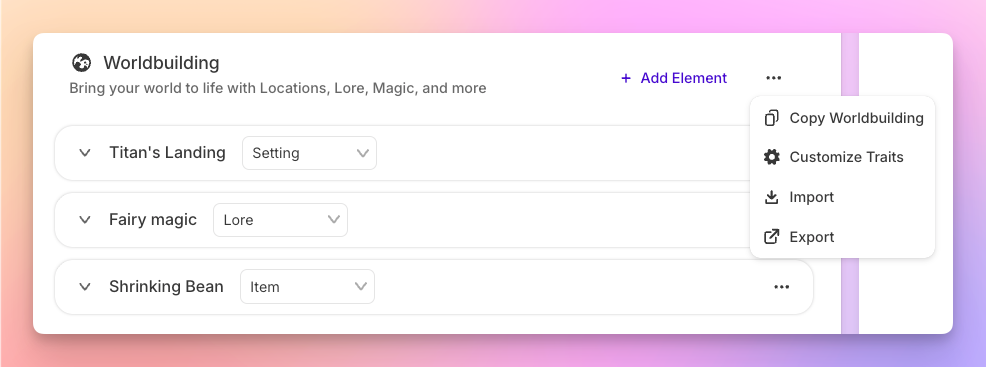
Sudowrite handles this through Worldbuilding cards inside the Story Bible. You create cards for settings, items, factions, lore, rules, and custom categories. Each card stores specific details. The political structure of a kingdom, the menu at a roadside diner, the slang of a 1970s punk scene. When you use the Write feature, the AI reads those cards automatically alongside up to 20,000 words of story context, producing prose that respects your world's internal logic.
Why Worldbuilding Matters Beyond Fantasy and Sci-Fi
Your Contemporary Novel Has a World Too
You're writing a thriller set in present-day Chicago. No dragons. No faster-than-light travel. So you skip worldbuilding. Huge mistake. Your detective works nights in a precinct with its own hierarchy, grudges that predate her arrival, and a coffee machine everyone pretends works. The neighborhood she patrols has its own economy, its own silence after midnight, its own rules about which doors you knock on. A Fiction Writers Survey found that 89% of writers using specialized fiction AI tools report better prose quality than general AI. Largely because tools like Sudowrite remember those granular details between sessions. Your world exists whether you document it or not. The question is whether your AI partner knows about it.
The Consistency Problem Across 80,000 Words
"I've been able to go from taking six months to a couple of years to write a novel…to about one or two months." Joe Vasicek, Fiction Author (Author of Genesis Earth)
Vasicek's speed didn't come from skipping details. It came from not having to re-explain them. According to a Publishing Perspectives study, fiction writers using AI complete first drafts 40% faster on average. But that speed collapses when the AI doesn't remember that your protagonist is left-handed, or that the river in chapter three freezes by chapter twelve. Sudowrite's Story Bible keeps worldbuilding cards active across your entire manuscript, so the AI produces consistent prose without you policing every paragraph.
Subcultures and Settings Are World Systems
Think about Donna Tartt's The Secret History. The world isn't another planet. It's a tiny classics department at a Vermont college, with its own rituals, power dynamics, and moral code. That's worldbuilding. A romance set in competitive ballroom dancing needs the same treatment: the hierarchy, the rivalries, the specific way judges score a paso doble. Sudowrite's Brainstorm feature can generate worldbuilding ideas across categories (places, objects, factions), giving you raw material to populate cards for any setting, from a space station to a suburban cul-de-sac.
How Worldbuilding Works in Sudowrite
The workflow is straightforward: you define your world in structured cards, and the AI reads those cards every time it writes. No prompt engineering. No copy-pasting context. Three stages.
Stage 1: Dump Everything You Know
Start in the Story Bible's Braindump section. Pour out every detail you have about your world, geography, social rules, technology level, what people eat for breakfast. Don't organize yet. Sudowrite uses this raw material to help generate your Synopsis, Characters, and Worldbuilding cards. As Francisco, a fiction writer and Dungeon Master, puts it:
"One of the best features of Sudowrite is how it gives you alternatives for phrasing, which helps avoid the repetition that often creeps into long-form writing."
Stage 2: Create Worldbuilding Cards
From your braindump, build cards in six categories: Settings (locations your characters inhabit), Items (objects that matter to the plot), Lore (history and mythology), Factions (groups with competing interests), Rules (the physics of your world, whether that's magic systems or workplace politics), and Custom (any category unique to your story). Each card holds specific details the AI references during generation.
Stage 3: Write, and Let the Cards Work
When you use Sudowrite's Write feature, it reads your Worldbuilding cards alongside your story text, POV settings, and outline. You don't tell the AI "remember, this city has a curfew." It already knows. The Describe feature pulls from the same cards when generating five-sense details for your settings, so a description of your protagonist entering a location automatically reflects the world you've built.
Getting Started with Sudowrite: Step-by-Step
Step 1: Start Your Story Bible with a World-First Braindump
What you'll accomplish: A raw foundation of world details your AI partner can draw from.
Open a new project in Sudowrite and navigate to the Story Bible. Hit the Braindump section and write everything you know about your world. Focus on what your protagonist encounters: the neighborhood they live in, the organization they work for, the unspoken rules of their social circle. Don't write a wiki. Write what matters to the story.
"Sudowrite makes it so much easier to write a chapter or short story, it's intuitive and helps me get the ideas out, fast." Liese Sherwood-Fabre, Author (Over 9,000 books sold)
Pro tip: Be specific about sensory details in your braindump. "The factory smells like burnt rubber and lemon cleaner" gives the AI far more to work with than "industrial setting."
Step 2: Build Your First Five Worldbuilding Cards
What you'll accomplish: Structured world data the AI reads automatically.
Create one card in each category: a Setting your protagonist frequents, an Item that matters to the plot, a Lore entry with relevant backstory, a Faction your protagonist interacts with, and a Rule that governs behavior. Keep each card focused, 100 to 300 words. You can always add more later.
Pro tip: For contemporary and historical fiction, "Rules" cards are gold. Document social norms, workplace hierarchies, or era-specific customs your characters navigate.
Step 3: Connect Cards to Your Outline and Start Writing
What you'll accomplish: AI-generated prose that already respects your world.
Link your outline chapters to documents in Sudowrite. When you click Write, the AI pulls from your Worldbuilding cards, Synopsis, Characters, and up to 25 linked chapters of preceding text. Your world details flow into the prose without you re-explaining them every session.
"I published 270,000 words last year and I'm on track to surpass that this year, all thanks to Sudowrite's efficiency. I wouldn't be where I am without it." Gianmarco, Romance and Sci-Fi Author
Step 4: Expand and Refine World Details as You Draft
What you'll accomplish: A living world document that grows with your story.
As you draft, you'll discover new world details. A character mentions a holiday you haven't defined, or a scene needs a specific neighborhood. Add new cards as they emerge. Use Chat to brainstorm details that fit your existing world. Use Describe to generate sensory-rich passages grounded in your Worldbuilding cards.
Pro tip: Sudowrite's Series Folder lets you share Worldbuilding cards across multiple books, so your world stays consistent if the story becomes a series.
Worldbuilding Approaches Compared
| Approach | AI Integration | Time to Set Up | Consistency Across Manuscript | Best For |
|---|---|---|---|---|
| Spreadsheets & Wikis | None. Manual reference only | 10-20+ hours | Low. Easy to forget or contradict details | Writers who enjoy the process itself |
| General AI (ChatGPT, Claude) | Chat-based, no persistent memory | 5-10 hours (re-explaining each session) | Low. Context resets between conversations | One-off brainstorming sessions |
| Sudowrite Story Bible | Automatic. Worldbuilding cards feed into Write, Describe, and Draft | 2-4 hours | High. AI reads cards every time it generates | Novel-length fiction in any genre |
Best Practices: Worldbuilding Tips for Fiction Writers
Build from the Protagonist Outward
Don't start with a map of your entire continent. Start with the room your protagonist wakes up in. What do they hear through the walls? What's the commute like? Expand only when the story reaches a new location or system. Sudowrite's Worldbuilding cards support this approach. Create cards for locations as your characters arrive, not before.
Make Rules Cards for Social Physics
Every world has unwritten rules. In a YA novel, it might be the cafeteria's seating hierarchy. In a historical thriller, it's who bribes whom. Document these in Rules cards with specific consequences for breaking them. Eric, a novelist, hit 1.2 million words in his first year using Sudowrite by staying focused on details like these rather than rebuilding context every session.
"My first year using Sudowrite, I hit 1.2 million words. It helped me stay focused and productive." Eric, Novel/Fiction Author
Use Describe to Test Your World's Texture
Highlight a setting reference and run Sudowrite's Describe feature. If the five-sense descriptions feel generic, your Worldbuilding cards need more detail. If the AI generates a sound, smell, or texture that surprises you and fits, your world is working. Piero, a non-fiction writer who's tested many tools, notes that Sudowrite "truly listens to writers, constantly improving the writing experience."
Keep Cards Under 300 Words Each
Resist the urge to write essay-length entries. Cards are reference material, not prose. Short, specific cards produce better AI output than sprawling ones. You can always create multiple cards for the same location if it has distinct aspects, one for the physical space, one for the social dynamics.
Common Mistakes
Building an Encyclopedia Nobody Reads
The temptation is real: you want to define every province, every historical era, every species of tree. But if your protagonist never visits the Northern Wastes, that card is dead weight. According to the Alliance of Independent Authors Report, AI-assisted editing reduces revision time by 35%, but only when your source material is focused. Build what the story touches. Delete what it doesn't.
Treating Worldbuilding as a Fantasy-Only Concern
A romance writer skipping worldbuilding is like a chef skipping seasoning because they're "just making pasta." Kayla, a romance author, uses Sudowrite specifically because generic AI doesn't understand the world-specific details of her genre: "I use Sudowrite for auto-writing when I get stuck. It helps generate ideas that I can build on and shape into my own." Every genre has a world. Document yours.
Forgetting That Worlds Change
Your story's world in chapter one isn't the same world in chapter thirty. Wars start. Businesses close. Seasons shift. Update your Worldbuilding cards as the story progresses. Sudowrite's Chapter Continuity reads up to 25 linked documents, but the cards themselves need to reflect your world's current state. Not just its starting conditions.
FAQ
What counts as worldbuilding outside of fantasy and sci-fi?
Any detail about the setting, social rules, power structures, or sensory environment your characters inhabit qualifies as worldbuilding. A legal thriller needs courthouse politics and firm hierarchy. A romance needs the specific culture of its setting, whether that's a small-town bakery or a competitive dance circuit. Sudowrite's Worldbuilding cards work for all of these.
How many Worldbuilding cards should I create?
Start with five to ten cards covering your protagonist's immediate environment, then add as the story demands. Each character card in Sudowrite's Story Bible holds up to 2,000 characters of backstory detail, so there's plenty of room for depth. The Writer's Digest Survey found that 73% of fiction writers report AI helps overcome writer's block, and having world details pre-loaded is a major reason why.
Do Worldbuilding cards actually change the AI's output?
Yes. Sudowrite's Write feature reads Worldbuilding cards alongside your manuscript text every time it generates prose. If you've documented that your fictional city has a 10 PM curfew, the AI won't write a casual midnight stroll without acknowledging it. Cards function as persistent context the AI checks automatically.
Can I use Worldbuilding cards for a series across multiple books?
Sudowrite's Series Folder shares Story Bible information, including Worldbuilding cards, across multiple books in the same project. Erwin T. Hurst Sr, founder of a family publishing company, has used Sudowrite to publish nine physical books with thirty-two more in editing. Series Folder keeps world details consistent across that scale.
What's the difference between Worldbuilding cards and the Synopsis?
The Synopsis summarizes your plot; Worldbuilding cards define the environment your plot happens in. They're complementary. The Synopsis tells the AI what happens. Worldbuilding cards tell it where, under what rules, and surrounded by what sensory details. Both feed into Sudowrite's Write and Draft features.
Should I worldbuild before or during drafting?
Both. Start with a lean foundation before drafting, then expand cards as new details emerge during writing. Sudowrite's Chat feature can help brainstorm world details mid-draft. The 92% of Sudowrite users who report completing manuscripts faster aren't front-loading months of world design, they're building iteratively as the story grows.
Related Reading
More craft-focused guides:
- Story Bible Template: How to Build One with Sudowrite — the foundation every Sudowrite feature depends on
- Best AI Writing Tool for Series Writers — Sudowrite vs. Scrivener + ChatGPT for multi-book work
- Co-Writing with AI: How Sudowrite Helps Without Taking Over Your Voice — staying in creative control as you scale
- Does AI Overwrite Your Voice? How Sudowrite Keeps Your Style Intact — voice preservation features explained
Knowing what not to overdo is useful. Knowing where to start when you're building from nothing is a different question. This guide to worldbuilding with Sudowrite covers the step-by-step process from first principles, including how the Story Bible stores your world logic and keeps it consistent across a full manuscript without requiring you to remember everything yourself.
Key Takeaways
These worldbuilding tips for fiction writers all lead to one conclusion: every story has a world, and the writers who document theirs (lean, focused, built outward from the protagonist) produce more consistent and immersive fiction.
- Start with what your protagonist touches, not what your atlas contains
- Sudowrite's Worldbuilding cards store settings, items, lore, factions, rules, and custom categories that the AI reads automatically during generation
- Any genre benefits. Contemporary, historical, romance, thriller, because every setting has its own physics
- Build iteratively, adding cards as your draft reveals what the story needs
Your world is already in your head. The craft is getting it onto the page without losing details between chapters, or between you and your AI writing partner.