

Table of Contents
You just spent three hours rewriting a confrontation scene. Your antagonist's dialogue feels wooden, your protagonist's reaction doesn't track with the breakdown she had in chapter nine, and you're 80,000 words deep with nobody to ask. Your beta readers won't finish for three weeks. Your editor costs $75 an hour. And ChatGPT? You'd have to paste in half your manuscript and pray it doesn't hallucinate your character's name.
The AI writing coach market is booming. The New York Times has covered how writers are turning to AI for feedback and drafting help, and paid AI coaching services now charge $50 to $200 per month for generic writing advice. But there's a gap none of them close: feedback that actually knows your story. Sudowrite Chat fills it — it reads your entire Story Bible and manuscript automatically, so every response is grounded in your characters, your plot, and your world. No briefing required.
Here's what you'll learn: how story-aware feedback works, where Chat beats every other option, and how to start using it today.
In This Guide
- What Is an AI Writing Coach?
- Why Sudowrite Chat for AI Writing Coaching
- How It Stacks Up: Chat vs. Every Other Feedback Option
- How Chat Works Inside Sudowrite
- Getting Started with Chat
- Best Practices for Story-Aware Feedback
- Common Mistakes Writers Make with AI Feedback
- FAQ
- Key Takeaways
TL;DR: Every feedback option for fiction writers is either slow, expensive, or completely uninformed about your manuscript. Sudowrite Chat reads your entire Story Bible and open documents automatically, giving you an AI writing coach that actually understands your characters, plot, and world — included free with every subscription plan.
What Is an AI Writing Coach?
An AI writing coach is an AI-powered tool that provides feedback, suggestions, and creative guidance on your fiction writing, going beyond grammar and spelling to address story-level concerns like character motivation, plot consistency, pacing, and dialogue quality. Unlike general AI chatbots that treat every prompt as a blank slate, a true AI writing coach understands the context of your specific manuscript.
The concept has evolved fast. Early AI writing tools could suggest word replacements or flag passive voice. Paid AI coaching services now offer feedback sessions, but they still require you to explain your story every time. The missing piece has always been memory — an AI that knows your book the way a critique partner does after reading every draft.
Sudowrite Chat closes that gap. It's an integrated sidebar inside the Sudowrite editor that can see your entire Story Bible — characters, worldbuilding, synopsis, outline — plus the full text of whatever document you have open. Ask it about a character's motivation, and it pulls from the character card you already built. Ask about a plot hole, and it cross-references your outline. No copy-pasting. No re-explaining. The AI writing coach already did its homework.
Why Sudowrite Chat for AI Writing Coaching
Your Beta Reader Can't Read Twenty Chapters in Twenty Seconds
You've rewritten the betrayal scene three times. Something's wrong with your secondary character's reaction, but identifying the problem means re-reading five chapters of setup. Your critique group meets monthly. Your beta reader just started chapter four.
Sudowrite Chat has already read every word. Ask "Does Marcus's reaction in this scene contradict his arc in chapters 6 through 10?" and you'll get an answer that references specific details from your Story Bible character card and prior chapters. According to Sudowrite user feedback, 86% of writers say this kind of story-aware coaching helped them solve plot problems they'd been stuck on.
The Numbers Say Writers Need Faster Feedback
A Writer's Digest Survey found that 73% of fiction writers report AI helps overcome writer's block. The Alliance of Independent Authors reports AI-assisted editing reduces revision time by 35%. But those numbers only hold when the AI actually understands what you're writing. The Fiction Writers Survey found that 89% of writers using specialized fiction AI tools report improved prose quality compared to general AI tools. Generic chatbots don't know your protagonist's name five messages later. Sudowrite Chat never forgets, because your Story Bible feeds it automatically.
"I use Sudowrite for auto-writing when I get stuck. It helps generate ideas that I can build on and shape into my own."
— Kayla, Romance Writer
Picture This: You Need Dialogue Help at 11 PM
Your editor's asleep. Your writing group doesn't meet until Thursday. You're trying to write a tense reunion scene between two estranged siblings, but the dialogue sounds like a therapy brochure instead of two people who haven't spoken in six years.
Highlight the dialogue. Open Chat. Type: "Make this dialogue sharper — they're both angry but neither wants to admit they missed each other." Chat reads the highlighted text, your character cards for both siblings, and the surrounding scene. The suggestions land because they're rooted in who these characters actually are, not who a generic AI imagines they might be.
"One of the best features of Sudowrite is how it gives you alternatives for phrasing, which helps avoid the repetition that often creeps into long-form writing."
— Francisco, Fiction Writer & Dungeon Master
How It Stacks Up: Chat vs. Every Other Feedback Option
| Feedback Source | Knows Your Story | Response Time | Cost | Feedback Depth |
|---|---|---|---|---|
| ChatGPT / Claude | No — starts from zero every session | Instant | Free–$20/mo | Surface-level without story context |
| Beta Readers | Partially — after reading the draft | Weeks to months | Free / reciprocal | Deep but slow and inconsistent |
| Professional Editor / Coach | After extensive briefing | Days to weeks | $500–$2,000+ per project | Expert-level but expensive |
| Paid AI Coaching Services | Limited — requires re-briefing | Hours to days | $50–$200/mo | Template-based, not story-specific |
| Sudowrite Chat | Yes — reads Story Bible + docs automatically | Instant | Included free with all plans | Story-aware, character-specific |
The gap is clear. Generic AI is fast but uninformed. Human feedback is informed but slow and expensive. Sudowrite Chat is both fast and informed.
How Chat Works Inside Sudowrite
Step 1: It Reads Your Story Bible
When you open Chat, it automatically loads your Story Bible data — characters, worldbuilding, synopsis, genre, style settings, and outline. You don't upload anything. You don't paste anything. The coaching starts informed.
Step 2: It Sees Your Open Document
Chat reads the full text of whatever document you're working in. Highlight a specific passage, and Chat zooms in on that selection while still understanding the broader manuscript context. You can ask about scene pacing, character voice, motivation gaps, or plot continuity.
Step 3: You Ask, It Coaches
Type a question or request. "Does Elena's decision here contradict chapter 7?" "Suggest three ways to increase tension in this scene." "Is my villain's motivation clear?" Every response draws from your actual story data. No hallucinated details, no generic writing tips pulled from thin air.
"Sudowrite makes it so much easier to write a chapter or short story — it's intuitive and helps me get the ideas out, fast."
— Liese Sherwood-Fabre, Author (Over 9,000 books sold)
Getting Started with Chat
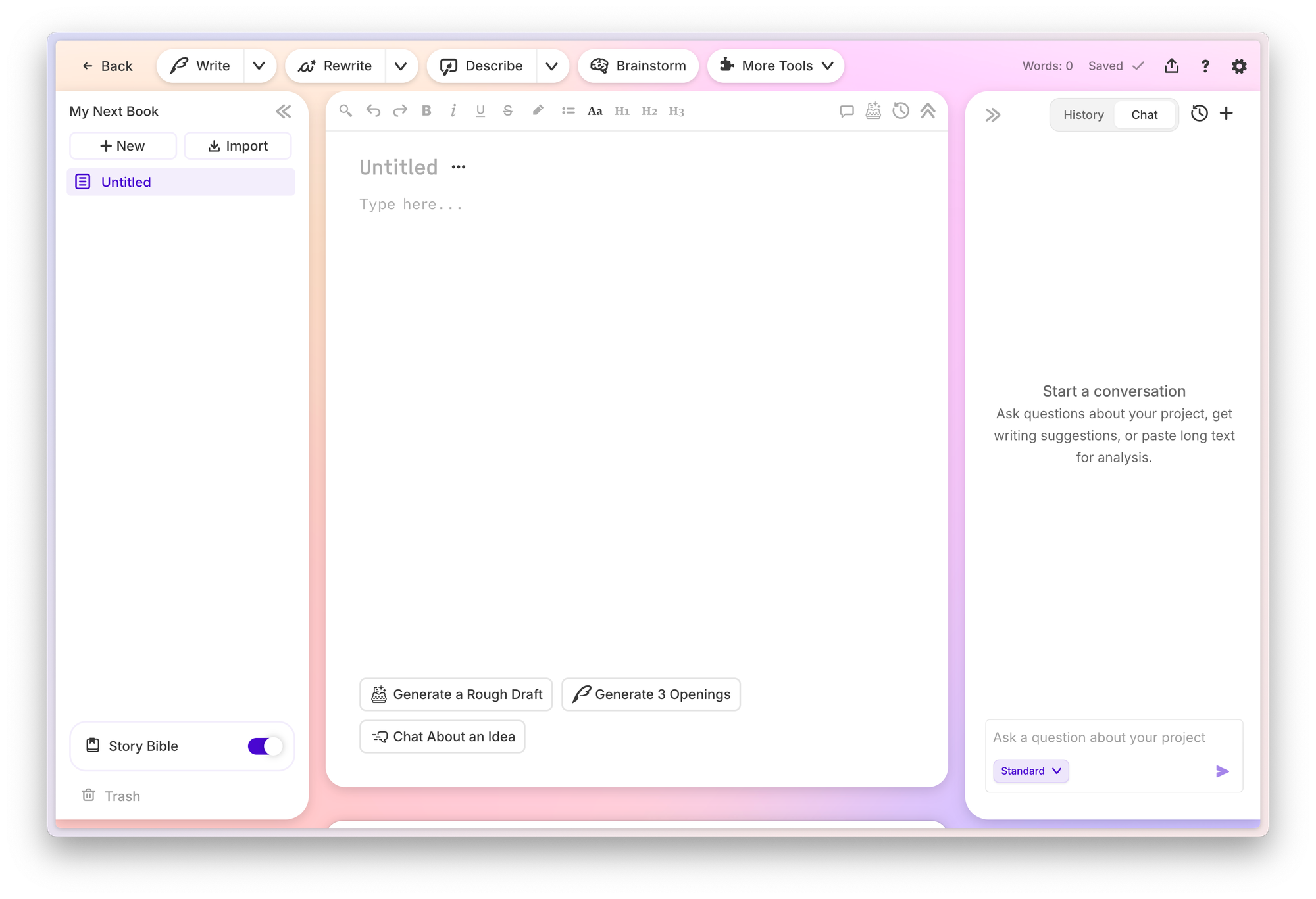
Step 1: Build Your Story Bible
What you'll accomplish: Give Chat the context it needs to coach you intelligently.
Start with the Braindump — record everything you know about your story. Then work through Synopsis, Characters, and Worldbuilding. The more detail in your character cards (personality, background, dialogue style), the sharper Chat's feedback gets. Even a basic Story Bible transforms Chat from generic AI into a story-aware writing coach.
Step 2: Open a Document and Start Writing
What you'll accomplish: Create the manuscript context Chat will read.
Write your scene, chapter, or whatever you're working on. Chat reads up to the full document text, so the more you've written, the more informed the coaching becomes.
Step 3: Open Chat and Ask Your First Question
What you'll accomplish: Get story-aware feedback in seconds.
Click the Chat sidebar. Try something specific: "Is my protagonist's reaction in this scene consistent with her character arc?" or "Suggest ways to increase the tension in this dialogue exchange." Highlight a passage for targeted feedback on that specific section.
Pro tip: The more specific your question, the more useful the answer. "Is this scene good?" gives you less than "Does this confrontation scene reveal enough about the power dynamic between these two characters?"
Step 4: Use Chat Across Your Entire Workflow
What you'll accomplish: Make Chat your ongoing creative partner.
Use Chat for scene feedback, plot hole detection, dialogue suggestions, character motivation checks, and brainstorming. According to Sudowrite internal data, users save an average of 15 hours per week on revision — and Chat is a major reason why.
"I've been able to go from taking six months to a couple of years to write a novel... to about one or two months."
— Joe Vasicek, Author of Genesis Earth
Best Practices for Story-Aware Feedback
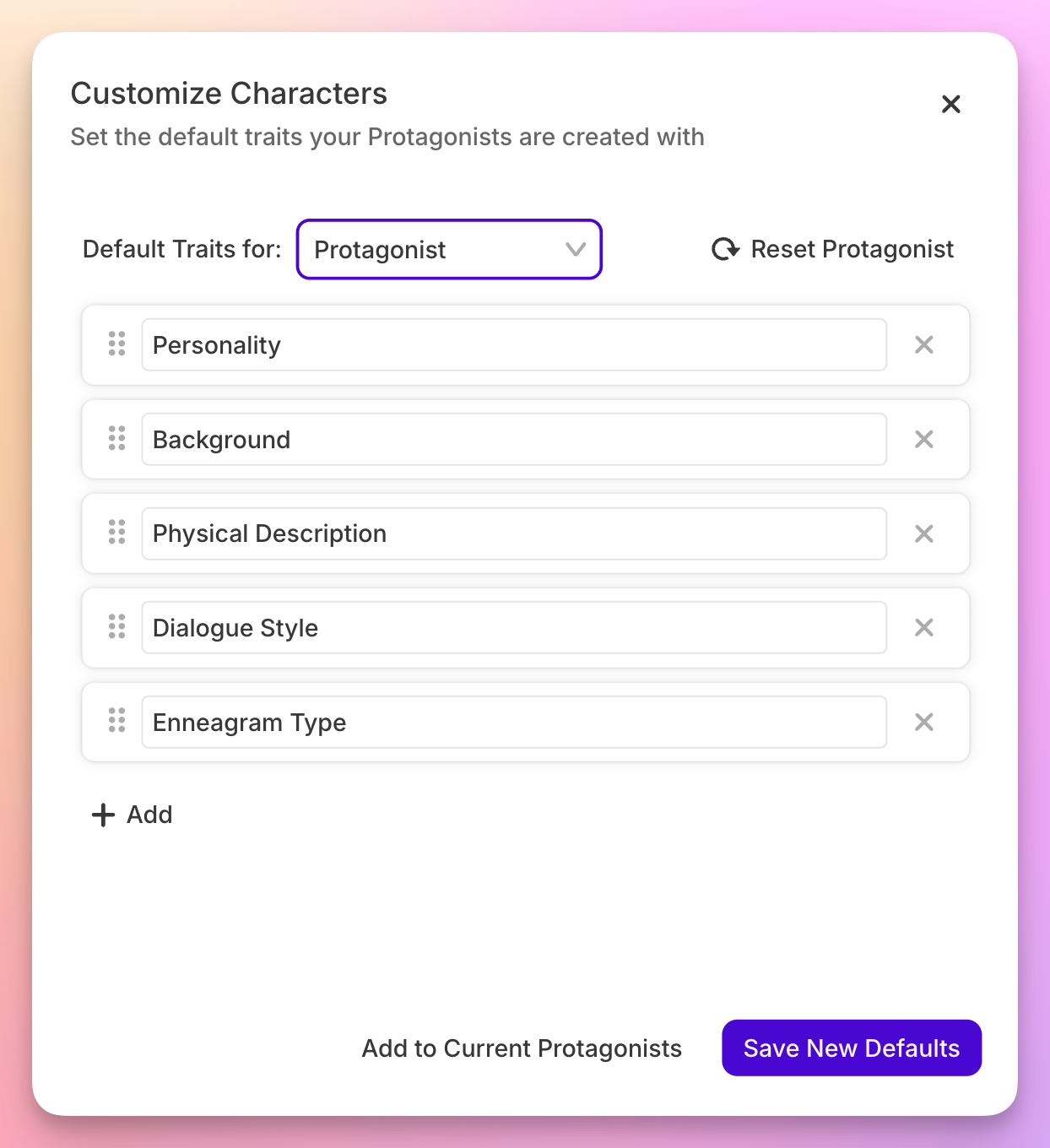
Fill out your character cards before asking Chat about character behavior. Chat's feedback on motivation, dialogue, and arc consistency is only as good as the character data in your Story Bible. A detailed character card with personality traits, background, and dialogue style turns vague suggestions into precise coaching.
Highlight the specific passage you want feedback on. You can ask Chat general questions about your story, but targeted feedback works best. Select the paragraph where the pacing drags or the dialogue falls flat, then ask Chat to address that exact problem. The Fiction Writers Survey found 89% of writers get better results from specialized fiction AI — specificity is why.
Ask 'why' questions, not just 'what' questions. Instead of "rewrite this scene," try "why does this scene feel flat?" Chat will reference your Story Bible and identify whether the problem is pacing, character motivation, missing sensory detail, or something else. Diagnosis before prescription.
"I'm impressed with how Sudowrite builds on user feedback. It's one of the few AI tools that truly listens to writers, constantly improving the writing experience."
— Piero, Non-Fiction Writer
Common Mistakes Writers Make with AI Feedback
Treating Chat Like a Generic Chatbot
Writers who skip the Story Bible and jump straight into Chat are using a sports car in first gear. Without character cards, worldbuilding details, and a synopsis, Chat's feedback defaults to general writing advice. Take twenty minutes to build your Story Bible, and every Chat interaction becomes story-specific.
Asking Vague Questions
"Is this chapter good?" gives you nothing useful. "Does my protagonist's decision to leave the city contradict the fear of abandonment I established in chapter three?" gives you actionable, story-aware coaching. Specificity is the difference between generic feedback and genuine insight.
Ignoring Chat During Revision
Most writers discover Chat while drafting and forget it during revision — the phase where informed feedback matters most. Sudowrite user data shows 92% of users complete manuscripts faster. Chat during revision is where that speed compounds, because you're catching inconsistencies before they become structural problems.
"My first year using Sudowrite, I hit 1.2 million words. It helped me stay focused and productive."
— Eric, Novel/Fiction Writer
FAQ
What exactly can Sudowrite Chat see from my manuscript?
Chat reads your entire Story Bible (characters, worldbuilding, synopsis, genre, style, outline) plus the full text of your open documents and any highlighted text. You don't need to copy-paste or brief it. The context loads automatically when you open the sidebar.
Is Chat included free with Sudowrite, or is it a paid add-on?
Chat is included with all Sudowrite subscription plans at no additional cost. Unlike paid AI coaching services that charge $50–$200 per month for generic feedback, Chat comes bundled with every Sudowrite tier, from Hobby to Professional.
How is Chat different from just using ChatGPT for writing feedback?
ChatGPT starts from zero every conversation and knows nothing about your characters, plot, or world. Sudowrite Chat reads your Story Bible and manuscript automatically. Ask ChatGPT about your protagonist's motivation, and it guesses. Ask Sudowrite Chat, and it references the character card you built.
Can Chat help with specific craft issues like show-don't-tell or pacing?
Yes — highlight a passage and ask Chat to evaluate pacing, sensory detail, dialogue rhythm, or narrative distance. Because Chat knows your genre and style settings from the Story Bible, its craft suggestions match the tone of your book rather than defaulting to generic literary fiction advice.
Does Chat work for series writers with multiple books?
Sudowrite's Series Folder shares Story Bible information across books, and Chat accesses that shared data. Characters and worldbuilding details carry over between installments, so Chat understands the full context of your series — not just the document you have open.
Will Chat replace my human editor or beta readers?
No, and it shouldn't. Chat fills the gap between those touchpoints. Use it for daily feedback while drafting and revising. Your human editor and beta readers still bring perspectives no AI can replicate — but you'll hand them a much cleaner manuscript.
"I published 270,000 words last year and I'm on track to surpass that this year, all thanks to Sudowrite's efficiency. I wouldn't be where I am without it."
— Gianmarco, Romance and Sci-Fi Writer
Key Takeaways
The feedback gap for fiction writers has always been the same problem in three forms: too slow, too expensive, or too uninformed. Sudowrite Chat collapses all three.
- Chat reads your Story Bible and manuscripts automatically — no briefing, no copy-pasting, no re-explaining your story
- Scene feedback, plot solving, motivation checks, and dialogue suggestions happen in seconds, grounded in your actual characters and world
- Chat is free for all Sudowrite subscribers, making story-aware AI coaching accessible to every fiction writer regardless of budget
- According to the Authors Guild Survey, 67% of professional novelists now use AI writing tools — the question isn't whether to get an AI writing coach, but whether yours actually knows your book
Stop explaining your novel to an AI that forgets everything between sessions. Start writing with a coach that already read the whole thing.
"Sudowrite has sped up how I write... we've published nine physical books, with thirty-two more waiting to go through editing."
— Erwin T. Hurst Sr, Founder of Family-Run Publishing Company