

Table of Contents
You know the scene. Your characters have been circling each other for six chapters. The tension's so thick you could cut it with a plot twist. And now you need to write that scene — the one where the door closes and the heat goes up — and your AI writing tool just handed you something that reads like it was written by a nervous robot in a turtleneck. Flat. Clinical. About as sensual as a terms-of-service agreement.
You're not alone. According to a Fiction Writers Survey, 89% of writers using specialized fiction AI tools report better prose quality than what general-purpose AI produces. The gap is even wider for romance. A spicy story generator built for fiction — like Sudowrite — understands that intimacy isn't just about explicit content. It's about tension, pacing, and emotional honesty at every heat level.
Here's what you'll learn: how the romance spice spectrum actually works, which AI tools and settings control heat level, and how to write scenes that match your vision — from sweet to scorching.
In This Guide
- What Is a Spicy Story Generator?
- The Spice Spectrum: Why Heat Level Matters
- How a Spicy Story Generator Works in Sudowrite
- Getting Started: Write Your First Spicy Scene
- Best Practices for Spicy AI Writing
- Common Mistakes
- FAQ
- Key Takeaways
TL;DR: Most AI tools either block mature content entirely or produce rushed, mechanical prose that kills the mood. Sudowrite's fiction-trained Muse model writes across the full romance spice spectrum — from closed-door to explicit — while the Creativity dial and Write Guided mode let you control exactly how hot each scene gets. 92% of Sudowrite users report completing manuscripts faster (Sudowrite User Survey).
What Is a Spicy Story Generator?
A spicy story generator is an AI writing tool designed to help romance and adult fiction authors create intimate scenes across a range of heat levels — from slow-burn tension to fully explicit encounters — while maintaining prose quality, character voice, and emotional depth. Unlike general chatbots that either refuse mature content or produce flat, formulaic output, a purpose-built spicy story generator treats romance as the craft it is.
The romance community has always used a "spice scale" — typically rated 1 to 5 peppers — to signal how much heat a book contains. That same framework applies to AI tools. A one-pepper scene requires restraint, implication, and emotional subtext. A five-pepper scene demands visceral sensory detail and confident, unfiltered prose. Most AI tools can't do either well.
Sudowrite addresses this with its Muse model, which is trained specifically on fiction storytelling. Muse handles mature content without restrictive filters while producing prose that reads like a human author wrote it. Features like Write Guided mode let you steer scene direction and intensity, while the Creativity dial controls how bold the language gets. The Story Bible keeps your characters consistent whether they're having coffee or tearing each other's clothes off.
The Spice Spectrum: Why Heat Level Matters
Readers Know Exactly What They Want
Romance is a $1.4 billion market, and readers don't mess around with expectations. Someone picking up a "closed-door" romance expects fade-to-black. Someone grabbing a five-pepper dark romance expects explicit, unapologetic heat. Miss the mark and you get one-star reviews. According to an Authors Guild Survey, 67% of professional novelists now use AI writing tools — but romance writers face a unique challenge. The tool needs to match their specific heat level, not some generic default. A spicy story generator that only writes at one temperature is about as useful as an oven with no dial.
The Problem with Generic AI
You've probably tried it. You paste your scene into ChatGPT or Claude, ask for something steamy, and get back... a paragraph that reads like it was written by someone who learned about intimacy from a Wikipedia article. Generic AI models are trained on everything — customer service emails, legal briefs, children's stories — so romance prose comes out watered down or weirdly formal. A Writer's Digest Survey found that 73% of fiction writers say AI helps overcome writer's block, but that stat only holds if the tool understands your genre. For romance, "understanding" means knowing the difference between a slow hand trailing down someone's spine and a clinical description of physical contact.
Why Spice Needs a Spectrum, Not a Switch
"I use Sudowrite for auto-writing when I get stuck. It helps generate ideas that I can build on and shape into my own."
— Kayla, Romance Writer
Here's the real issue: spice isn't binary. It's not "clean or dirty." The best romance novels modulate heat scene by scene. Chapter three might be a 2-pepper slow burn. Chapter twelve hits 4 peppers. Chapter twenty pulls back to a tender 1-pepper moment. You need a tool that moves with you across that spectrum, not one locked at a single setting. Sudowrite's Tone Shift feature includes Romantic and Sensual modes specifically for this kind of calibration, and the Creativity Slider lets you fine-tune risk level on every generation.
How a Spicy Story Generator Works in Sudowrite
The romance spice spectrum maps directly to Sudowrite's feature set. Here's how each heat level translates to specific tools and settings.
The Spice Scale Comparison Table
| Spice Level | What It Looks Like | Sudowrite Settings | Key Feature |
|---|---|---|---|
| 1 Pepper — Sweet | Fade to black. Emotional tension only. | Tone Shift: Romantic. Creativity: Low-Mid. | Write Auto mode |
| 2 Peppers — Mild | Kissing, implied intimacy, sensual language. | Tone Shift: Sensual. Creativity: Mid. | Describe (touch, sight) |
| 3 Peppers — Medium | On-page intimacy with tasteful detail. | Write Guided + specific direction. Creativity: Mid-High. | Write Guided mode |
| 4 Peppers — Hot | Explicit scenes with full sensory detail. | Muse model. Creativity: High. Guided direction. | Expand + Describe |
| 5 Peppers — Scorching | No-holds-barred explicit content. | Muse unfiltered. Creativity: Max. Detailed guidance. | Write Guided + Creativity dial |
The Creativity Dial: Your Heat Thermostat
The Creativity Slider in Sudowrite controls how predictable or adventurous the AI's output gets. For romance, think of it as your scene's thermostat. At lower settings, Muse plays it safe — implied touches, restrained metaphors, emotions over actions. Crank it higher and the prose takes bigger swings: bolder sensory language, more unexpected metaphors, less restraint. A Fiction Writers Survey found that 89% of writers using specialized fiction AI tools prefer the output over general AI. The Creativity dial is a big reason why — you're not just toggling "explicit on/off." You're controlling gradation.
Write Guided Mode: Steering the Scene
Write Guided reads up to 1,000 words around your cursor, then generates three direction options — or you type your own instruction. For spicy scenes, this is where the magic happens. You can write something like "increase the physical tension, focus on touch and breath, keep it at a 3-pepper level" and Muse follows your lead. You're not prompt engineering. You're directing a scene, the way a novelist would outline a beat before writing it. Paired with the Story Bible — which keeps track of your characters' physical descriptions, dialogue styles, and relationship dynamics — Write Guided produces intimate scenes that stay true to who these people are.
Getting Started: Write Your First Spicy Scene
Step 1: Set Up Your Story Bible for Romance
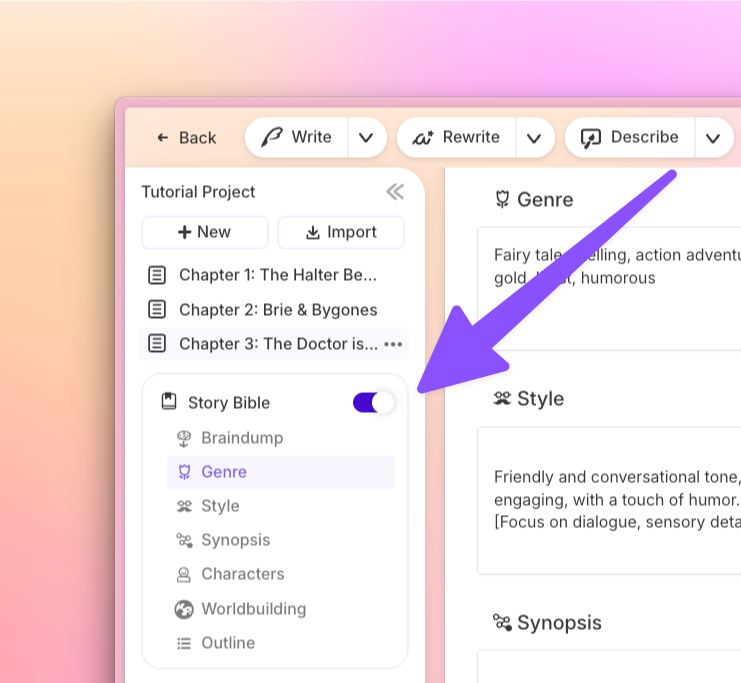
What you'll accomplish: A character and relationship foundation that keeps intimate scenes consistent.
Open your Story Bible and define your lead characters with detail that matters for romance: physical descriptions, personality traits, the dynamic between them (enemies-to-lovers? second chance? forbidden?). In the Genre field, be specific. "Contemporary romance, friends-to-lovers, 3-pepper heat level" gives Muse dramatically better context than just "romance." Set your Style to describe the prose voice you want — lyrical and lush, or direct and raw.
Pro tip: Add notes about your characters' boundaries and emotional triggers. Muse reads these during generation and writes scenes that respect who these people are.
Step 2: Write Your Lead-In, Then Let Muse Continue
What you'll accomplish: A scene that transitions naturally from emotional buildup to physical intimacy.
Write at least a few hundred words of lead-in — the tension, the dialogue, the moment before contact. Then position your cursor where the heat should increase and use Write in Guided mode. Type a direction like: "They kiss for the first time. Slow, uncertain. Focus on sensation — her heartbeat, his hands." Muse generates options that continue from your prose, matching your voice and your characters.
"I published 270,000 words last year and I'm on track to surpass that this year, all thanks to Sudowrite's efficiency. I wouldn't be where I am without it."
— Gianmarco, Romance and Sci-Fi Writer
Step 3: Dial the Heat with Creativity and Tone Settings
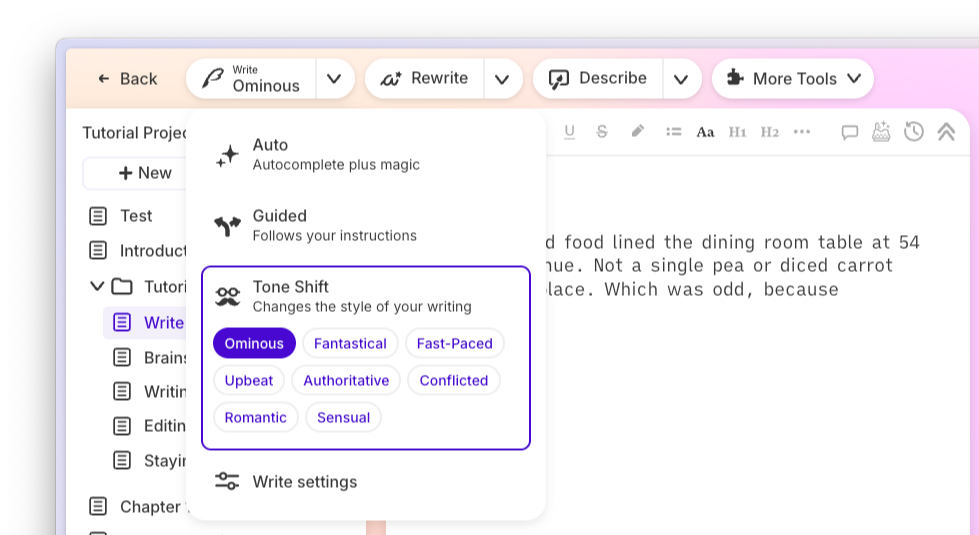
What you'll accomplish: Precise control over how explicit or restrained the scene reads.
Before generating, set your Creativity Slider to match your target pepper level. For a 1-2 pepper scene, keep it at mid or below. For 4-5, push it toward the high end. Select Tone Shift "Sensual" for scenes focused on atmosphere and feeling, or stick with Guided mode for maximum directorial control. Generate multiple cards (up to 6 variations) and pick the one that nails your heat level. You can always mix paragraphs from different generations.
Pro tip: Use Describe on specific moments — a touch, a look, a physical detail — to layer in five-sense texture after drafting.
Step 4: Refine with Rewrite and Expand
What you'll accomplish: A polished spicy scene with the right intensity and emotional weight.
Highlight any passage that feels flat or rushed. Rewrite's "More Intense" mode increases pacing and emotional impact. "More Descriptive" adds imagery and sensory detail. "Show Not Tell" converts telling statements into embodied action — essential for scenes where a character's physical reaction reveals emotion better than internal monologue could. For passages that feel too brief, Expand adds depth without filler. The Publishing Perspectives Study found that fiction writers using AI complete first drafts 40% faster on average, and these revision tools are a big part of why.
Best Practices for Spicy AI Writing
Match Your Spice Level to Your Story Bible Genre Tag
Your Genre field in Story Bible isn't just metadata — Muse reads it on every generation. "Steamy paranormal romance, 4-pepper, enemies-to-lovers" produces fundamentally different output than "romance." The more specific you get about your subgenre and heat level, the less editing you'll do after. Think of Genre as your standing order with the AI.
Use Describe for Sensory Layering, Not Just Visual Detail
Most writers default to sight. But the best spicy scenes live in touch, sound, and smell. After drafting a scene, highlight key moments and run Describe specifically for touch and sound. Sudowrite generates metaphors and sensory details drawn from the surrounding context, grounding physical moments in the world you've built.
Generate Multiple Cards and Frankenstein the Best Parts
Don't treat any single AI generation as the final draft. Set your card count to 4-6, generate variations at different creativity levels, and combine the strongest lines from each. One card might nail the dialogue. Another captures a physical moment perfectly. Your job is editorial — stitch the best pieces together and make them yours.
Common Mistakes
Writing Spicy Scenes Without Character Context
The AI doesn't know your characters have unresolved trauma, a power dynamic, or a twelve-chapter history of near-misses unless you tell it. Skipping the Story Bible means your intimate scenes could belong to anyone. Fill out character cards with emotional specifics, not just hair color. Muse reads these during every generation.
Keeping the Creativity Dial at Default for Every Scene
The default middle setting works fine for regular prose. For spicy scenes, it's boring. Leaving Creativity at the same level for a 1-pepper fade-to-black and a 5-pepper explicit scene means neither hits right. Adjust it per scene. That's what it's for.
Trying to Prompt-Engineer a Chatbot Instead of Using Purpose-Built Tools
Spending twenty minutes crafting the perfect prompt in ChatGPT to coax out a passable romance scene is time you could've spent actually writing. Sudowrite's Guided mode, Tone Shift, and Creativity dial replace prompt engineering with simple controls. According to Sudowrite Internal Data, users save an average of 15 hours per week on revision alone.
FAQ
What spice levels can a spicy story generator handle?
Sudowrite's Muse model writes across the full 1-to-5 pepper spectrum, from closed-door romance to fully explicit scenes. The Creativity dial and Write Guided mode let you target a specific heat level rather than getting a one-size-fits-all output.
Can AI write romance that doesn't sound robotic?
Specialized fiction AI produces dramatically better romance prose than general chatbots. Sudowrite's Muse model is trained on fiction storytelling, so the output reads like a human author — not a corporate email generator wearing a lace mask.
How do I keep characters consistent during intimate scenes?
Use Sudowrite's Story Bible to store character details that the AI reads during every generation. Physical descriptions, personality traits, dialogue style, and relationship dynamics all inform how Muse writes your characters in any scene, including spicy ones.
Is Sudowrite safe for writing explicit content?
Muse allows mature content without restrictive filters or risk of account suspension for writing fiction. Unlike general AI tools that block or censor adult content, Sudowrite is built for fiction writers across all genres and heat levels.
How does Write Guided mode work for spicy scenes?
Write Guided reads the surrounding text and lets you type specific directions for what should happen next. You can describe the emotional beat, physical intensity, and pace you want, and Muse generates options that follow your lead.
Do I need to learn prompt engineering?
No. Sudowrite replaces prompt engineering with a visual interface — Creativity dial, Tone Shift, Guided mode, Describe, Rewrite. You click buttons and adjust sliders instead of crafting elaborate text prompts.
"Sudowrite makes it so much easier to write a chapter or short story — it's intuitive and helps me get the ideas out, fast."
— Liese Sherwood-Fabre, Author (Over 9,000 books sold)
Key Takeaways
Writing spicy romance with AI isn't about finding a tool that "allows" explicit content. It's about finding one that understands heat level is a craft decision, not a content policy toggle.
- The spice spectrum (1-5 peppers) maps directly to Sudowrite's Creativity dial — lower for sweet, higher for scorching
- Write Guided mode lets you direct intimate scenes the way you'd outline a beat, not engineer a prompt
- Story Bible keeps characters consistent whether they're arguing over breakfast or in bed together
- Describe and Rewrite add sensory depth that separates good romance from forgettable romance
Your scenes. Your heat level. Your voice — just faster.