

Table of Contents
You just finished Chapter 24 of your fantasy novel. Your protagonist walks into a tavern and orders ale with coins she lost in a river three chapters ago. You won't catch it during drafting. You probably won't catch it during revision either. But your readers will, and they'll never let you forget it.
Plot holes aren't a sign of bad writing. They're a sign of being human, trying to juggle 80,000 words of character details, timeline events, and worldbuilding rules inside one overtaxed brain. According to the Fiction Writers Survey, 89% of writers using specialized fiction AI tools report better prose quality than they get from general AI. The difference comes down to memory.
Sudowrite's Chapter Continuity feature solves the memory problem by linking up to 25 chapters into one continuous narrative the AI can actually read. You'll learn how to avoid plot holes by understanding the five types that kill reader trust, how Chapter Continuity prevents each one, and how to set it up in your own project.
In This Guide
- What Are Plot Holes, Really?
- Why Plot Holes Matter More Than You Think
- How Chapter Continuity Prevents Plot Holes
- Getting Started with Sudowrite
- Best Practices
- Common Mistakes
- FAQ
- Key Takeaways
TL;DR: Plot holes happen because no one — human or AI — can hold an entire novel in memory at once. Sudowrite's Chapter Continuity links up to 25 documents with 20,000 words of context, so the AI treats your manuscript as one continuous story instead of isolated fragments.
What Are Plot Holes, Really?
A plot hole is any contradiction, gap, or logical impossibility in your narrative that breaks the reader's trust in your story world. Plot holes range from minor continuity errors (a character's eye color changing) to story-breaking contradictions (a locked-room mystery where the door was unlocked two chapters earlier). They're the cracks in your story's foundation, and every reader who spots one starts looking for more.
The real problem? Traditional writing tools don't track continuity at all, and generic AI tools like ChatGPT reset their memory every session. You paste in Chapter 20, the AI has zero knowledge of Chapters 1 through 19, and suddenly it's generating text that contradicts your established world. AI doesn't create plot holes out of malice. It creates them out of amnesia.
Sudowrite approaches this differently. The Story Bible stores character details, worldbuilding rules, and plot outlines in a persistent reference the AI reads every time it generates text. Chapter Continuity goes further by chaining your actual chapter documents together, giving the Write feature access to 20,000 words of prior narrative across up to 25 linked chapters. The AI doesn't guess what happened before. It reads it.
Why Plot Holes Matter More Than You Think
The Five Types That Destroy Reader Trust
You've seen lists of "common plot holes" that are vague and unhelpful. Here are the five specific categories that actually matter, with examples you'll recognize from your own drafts:
- Character inconsistencies — personality shifts, forgotten abilities, physical description changes
- Timeline errors — events happening in impossible sequences, seasons that don't track
- Forgotten threads — subplots introduced and never resolved, Chekhov's gun that never fires
- World contradictions — magic system rules that change, geography that shifts between chapters
- Character knowledge mistakes — a character acting on information they haven't learned yet
Every one of these stems from the same root cause: lost context.
The Numbers Behind the Problem
According to the Authors Guild Survey, 67% of professional novelists now use AI writing tools. But here's the catch: most of those tools have no memory between sessions. The Publishing Perspectives Study found fiction writers using AI complete first drafts 40% faster on average, but speed without continuity tracking just means you're creating plot holes faster. Data from Sudowrite shows 86% of users say Story Bible features helped them overcome plot problems specifically because the AI maintains context the writer provides.
"One of the best features of Sudowrite is how it gives you alternatives for phrasing, which helps avoid the repetition that often creeps into long-form writing."
— Francisco, Fiction Writer & Dungeon Master
What Readers Actually Do When They Find One
Picture your ideal reader, three-quarters through your novel, fully invested. They hit a contradiction. The spell that required blood sacrifice in Chapter 5 now works with a wave of the hand in Chapter 30. That reader doesn't think "oh, the author made a mistake." They think the story doesn't respect them. One plot hole is forgivable. Two makes them skeptical. Three, and you've lost them for good. The Alliance of Independent Authors Report found AI-assisted editing reduces revision time by 35%, but only when the AI has enough context to catch these errors before readers do.
How Chapter Continuity Prevents Plot Holes
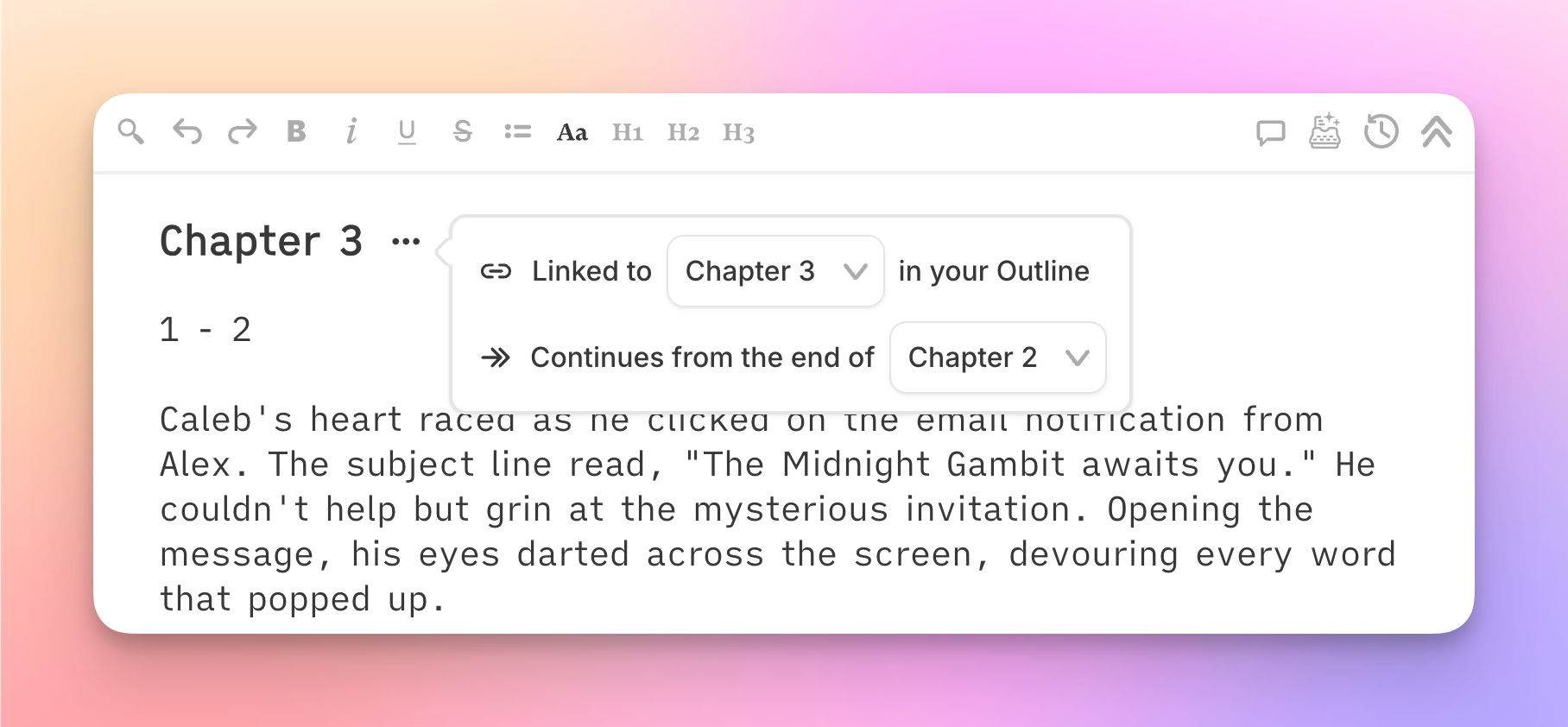
Sudowrite's approach to plot hole prevention works in three layers, each addressing a different failure point in the writing process.
Layer 1: The Story Bible as Your Single Source of Truth
Before you write a single chapter, the Story Bible captures your characters (with pronouns, physical descriptions, personality, dialogue style), worldbuilding rules, and plot outline. Every character card can hold detailed backstory. You can store up to 2,000 characters. When any Sudowrite feature generates text, it reads this data first. Your protagonist's eye color doesn't drift because the AI checks the card every time.
Layer 2: Chapter Linking Across 25 Documents
Here's where Chapter Continuity does its real work. You link your chapter documents in sequence, and the Write feature reads up to 20,000 words of preceding text across those linked chapters. Not summaries. Not keywords. Your actual prose. So when Chapter 15 references an event from Chapter 3, the AI has Chapter 3's text in its context window. Timeline errors and forgotten threads drop dramatically because the AI is reading the same story your reader will.
Layer 3: The Comparison That Makes It Clear
| Tracking Method | Context Window | Character Consistency | Timeline Tracking | Forgotten Thread Prevention | Setup Effort |
|---|---|---|---|---|---|
| No system | Whatever you remember | Manual only | Manual only | Hope and prayer | None |
| Manual tracking (spreadsheets, wikis) | Whatever you update | Good if maintained | Good if maintained | Depends on discipline | High, ongoing |
| Sudowrite Chapter Continuity | 20,000 words across 25 chapters + Story Bible | Automatic via character cards | Built into linked context | AI reads prior chapters | One-time setup |
The difference is automation. Manual tracking works until you forget to update the spreadsheet. Chapter Continuity works because it reads your manuscript directly.
Getting Started with Sudowrite: Step-by-Step
Step 1: Build Your Story Bible First
What you'll accomplish: A persistent reference document the AI consults before every generation.
Start with the Braindump feature. Pour everything you know about your story into it. Then build out your character cards with physical descriptions, personality traits, and dialogue style. Add worldbuilding entries for your magic systems, political structures, geography, anything that must stay consistent. The more specific you get here, the fewer continuity errors downstream.
Pro tip: Import existing character details from text files or CSV if you've been tracking in spreadsheets.
Step 2: Create Separate Documents for Each Chapter
What you'll accomplish: The building blocks Chapter Continuity needs to function.
Each chapter gets its own document in Sudowrite. Don't dump your entire novel into one file. Chapter Continuity works by linking individual documents in sequence, so the architecture matters. Name them clearly: "Chapter 1 - The Arrival," "Chapter 2 - First Blood."
Step 3: Link Your Chapters in Order
What you'll accomplish: A continuous narrative chain the AI reads automatically.
Link each chapter document to the next using Sudowrite's document linking. The Write and Draft features then read up to 20,000 words of preceding text across up to 25 linked documents. Your AI now has the same continuity awareness a human editor would.
Pro tip: Set your POV and Tense in the project settings so the AI maintains narrative consistency across every linked chapter.
Step 4: Write with Continuity Active
What you'll accomplish: New prose that respects everything you've already established.
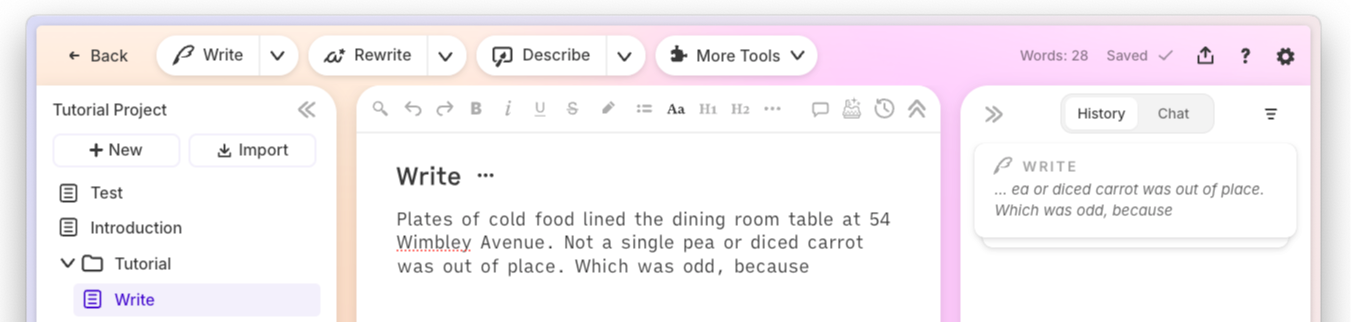
With chapters linked and Story Bible populated, use the Write feature in Auto or Guided mode. The AI reads your prior chapters, character cards, worldbuilding, and outline. That sword your protagonist lost? The AI knows it's gone. That character who died in Chapter 8? They won't show up alive in Chapter 22.
"I've been able to go from taking six months to a couple of years to write a novel... to about one or two months."
— Joe Vasicek, Author of Genesis Earth
Best Practices for Plot Hole Prevention
Populate Character Cards Before You Draft
Don't build your Story Bible retroactively. The Writer's Digest Survey found 73% of fiction writers report AI helps overcome writer's block, but that help only works if the AI knows your characters. Fill out every character card with pronouns, physical description, and key relationships before Chapter 1. Think of it as briefing your co-writer.
Review Linked Context When Switching POV
If your novel uses multiple viewpoints, check that your POV settings match the current chapter. Sudowrite's POV and Tense system lets you set these per chapter, so your first-person narrator doesn't accidentally slip into third person limited because the previous linked chapter used a different voice.
Use Chat to Audit for Contradictions
After drafting a sequence of chapters, open Sudowrite's Chat feature and ask it to check for inconsistencies. Chat reads your entire Story Bible and full document text. Ask specific questions: "Does Elena's timeline make sense between Chapters 4 and 9?" The chat reads what you wrote, not what you intended.
Common Mistakes
Skipping the Story Bible
Many writers jump straight into drafting because they think they'll remember everything. You won't. At 80,000 words, even meticulous writers lose track of eye colors, street names, and which character knows what. Build the Story Bible first. Your future self will be grateful.
Writing Everything in One Document
Dumping your entire manuscript into a single file defeats Chapter Continuity. The feature needs separate, linked documents to create the reading chain. One document means the AI can only look backward within that file, with no structured chapter awareness.
Never Re-checking Linked Chapter Order
You rewrite Chapter 6, split Chapter 10 into two parts, and add a new prologue. If you don't verify your chapter links still follow the correct sequence, the AI reads your story out of order and generates prose based on a scrambled timeline.
FAQ
What exactly is a plot hole in fiction writing?
A plot hole is any internal contradiction, logical gap, or unresolved element that breaks the consistency of your story. Common examples include characters knowing information they shouldn't have, timeline impossibilities, and abandoned subplots. They range from minor (wrong eye color) to story-breaking (dead character reappearing).
Can AI writing tools actually prevent plot holes?
Only if the AI has memory of your full story. Generic tools like ChatGPT reset every session and have no awareness of your previous chapters. Sudowrite's Chapter Continuity maintains context across up to 25 linked documents, giving the AI access to 20,000 words of your prior narrative each time it generates text.
How does Sudowrite's Chapter Continuity work?
You link chapter documents in sequence, and Sudowrite's Write feature reads the preceding text automatically. Combined with Story Bible data for characters, worldbuilding, and plot outlines, the AI generates prose that's consistent with everything you've already established. No manual re-pasting between sessions.
How many chapters can Sudowrite track at once?
Chapter Continuity supports up to 25 linked documents with a context window of 20,000 words. For most novels, that covers the recent narrative history the AI needs to maintain consistency. The Story Bible supplements this with persistent character and worldbuilding data across the entire project.
Do I still need to proofread for plot holes if I use Chapter Continuity?
Yes, but your job gets significantly easier. Sudowrite's Sudowrite User Survey shows 92% of users complete manuscripts faster. Chapter Continuity prevents the most common AI-generated contradictions, but a final human read-through catches nuances no tool can. Use Chat to audit specific continuity questions during revision.
What's the difference between Story Bible and Chapter Continuity?
Story Bible stores reference data (characters, worldbuilding, plot outlines), while Chapter Continuity links your actual chapter text into a reading chain. They work together. The Story Bible tells the AI who your characters are. Chapter Continuity tells the AI what those characters have done so far in the actual manuscript.
Key Takeaways
Plot holes aren't a talent problem. They're a memory problem. And solving memory is exactly what Chapter Continuity was built for.
- Build your Story Bible before drafting — character cards and worldbuilding entries prevent the most common consistency errors
- Link chapters in Sudowrite's Chapter Continuity to give the AI 20,000 words of prior narrative context across 25 documents
- Use Chat to audit for contradictions after drafting multi-chapter sequences
- The comparison table above tells the real story: automated tracking beats manual systems because it doesn't depend on your discipline at 2 AM on a deadline
Your readers don't care how hard continuity tracking is. They care that the story holds together. Give yourself the tool that makes that automatic.
"Sudowrite has sped up how I write... we've published nine physical books, with thirty-two more waiting to go through editing."
— Erwin T. Hurst Sr, Founder of Family-Run Publishing Company