


Table of Contents
You've got a 90,000-word novel rattling around in your skull. Characters with conflicting motivations, a world with its own rules, plot threads that need to land thirty chapters from now. And you're tracking all of it... where, exactly? A Google Doc with seventeen headings and no structure? A spreadsheet you stopped updating in chapter four?
A story bible template solves this. But most templates floating around online are just flat checklists. Fill in the blanks, forget about them, never look at them again. According to a Writer's Digest Survey, 73% of fiction writers report AI helps overcome writer's block — and a properly built story bible is a big reason why. Sudowrite's Story Bible takes a different approach: each section feeds the next, creating a layered document that the AI actually reads when it writes with you.
Here's what you'll learn: what goes in a story bible, how to build one where every layer connects, and how Sudowrite automates the hard parts.
In This Guide
- What Is a Story Bible Template?
- Why a Story Bible Matters for Fiction Writers
- How a Story Bible Works: Layer by Layer
- Manual vs. Sudowrite Story Bible
- Getting Started with Sudowrite: Step-by-Step
- Best Practices
- Common Mistakes
- FAQ
- Key Takeaways
TL;DR: Most story bibles are dead documents — you fill them out and never touch them again. A good story bible is a living system where each layer (braindump, synopsis, genre, characters, worldbuilding, outline, scenes) feeds the next. Sudowrite's Story Bible builds this interconnected structure automatically, and the AI references every layer when it writes with you.
What Is a Story Bible Template?
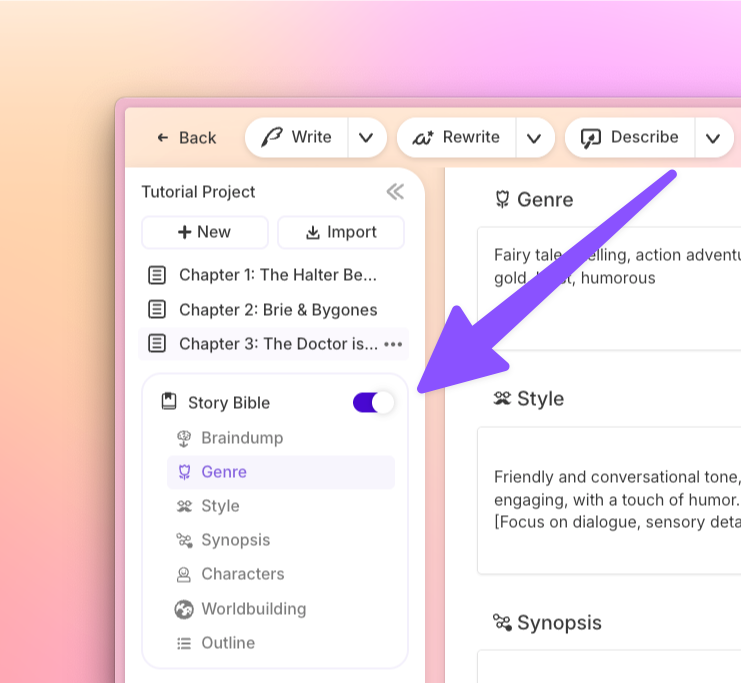
A story bible template is a structured planning document that stores every critical element of your novel — characters, worldbuilding, plot, style, and tone — in a format that keeps your story consistent from first page to last. Traditionally used in TV writers' rooms, the story bible has become essential for novelists managing complex narratives across 60,000 to 120,000 words.
The problem with most templates is they treat each section as independent. Character sheets live in one tab, worldbuilding in another, outline somewhere else. Nothing talks to anything. You fill them out, file them away, and by chapter twelve, your protagonist's eye color has changed twice.
Sudowrite's Story Bible works differently. It follows a deliberate sequence — Braindump, Synopsis, Genre and Style, Characters, Worldbuilding, Outline, Scenes — where each section generates from and builds on the one before it. Your braindump shapes your synopsis. Your synopsis informs your characters. Your characters influence your outline. And when the AI writes prose, it reads all of it. Not a dead reference doc. A living, interconnected system.
Why a Story Bible Matters for Fiction Writers
The Consistency Problem Nobody Talks About
You're 40,000 words deep into your fantasy novel. Your protagonist's mentor was established as left-handed in chapter three — except you forgot, and now he's drawing a sword with his right hand in chapter nineteen. Your readers will notice. You won't — not until the embarrassing Amazon review.
Maintaining consistency across a full manuscript is brutal. The Fiction Writers Survey found that 89% of writers using specialized fiction AI tools report improved prose quality compared to general AI. The reason? Tools like Sudowrite's Story Bible give the AI a memory. Character details, worldbuilding rules, and plot structure stay locked in — so when the Write feature continues your story, it knows your mentor is left-handed.
Speed Without Sacrificing Depth
"I've been able to go from taking six months to a couple of years to write a novel...to about one or two months."
— Joe Vasicek, Fiction Author (Author of Genesis Earth)
A Publishing Perspectives Study found fiction writers using AI complete first drafts 40% faster on average. But speed means nothing if your characters go flat or your world contradicts itself. A layered story bible is what makes fast drafting possible without losing depth — the AI isn't guessing. It's reading your blueprint.
Your AI Can't Help You If It Can't Remember You
Here's the thing about general AI tools like ChatGPT: every session starts from zero. You paste in context, it forgets, you paste again. Sudowrite's Story Bible stays persistent across your entire project. The Write feature reads up to 20,000 words of context plus all your Story Bible data — genre, style, synopsis, character cards, worldbuilding — every single time it generates prose. No re-explaining. No drift.
How a Story Bible Works: Layer by Layer
The key concept here is sequence. A story bible isn't seven independent sections. It's seven layers, each one feeding the next.
Layer 1: Braindump → Synopsis → Genre and Style
Start with everything in your head. Fragments of scenes, character sketches, that one image that won't leave you alone. In Sudowrite, the Braindump captures this raw material. From there, the platform generates a Synopsis — a structured summary that becomes the foundation for everything else. Then you define Genre (which sets tropes and conventions) and Style (your voice, your rules). The more specific you are — "slow-burn enemies-to-lovers romance" beats "romance" — the better every downstream section becomes.
Layer 2: Characters → Worldbuilding
Your synopsis already established who matters and why. Now you build character cards — pronouns, personality, background, physical description, dialogue style — with the synopsis as context. Sudowrite can store up to 2,000 characters per Story Bible. Worldbuilding comes next: settings, factions, magic systems, political structures. Each entry reads what came before it, so your world and your characters stay aligned from the start.
"One of the best features of Sudowrite is how it gives you alternatives for phrasing, which helps avoid the repetition that often creeps into long-form writing."
— Francisco, Fiction and Tabletop Gaming Writer
Layer 3: Outline → Scenes → Prose
The outline builds on your synopsis, characters, and world — not in a vacuum. You can create unlimited chapters with no word limit, and link each chapter to a document for stronger AI context. Scenes break chapters into individual story moments. And when you generate a draft, the AI reads all of it: scenes, outline, characters, worldbuilding, genre, style, synopsis. Every layer. That's why the output feels like your story, not generic AI slop.
Manual vs. Sudowrite Story Bible
| Aspect | Manual Story Bible | Sudowrite Story Bible |
|---|---|---|
| Setup time | Hours to days — building templates, filling sections independently | Minutes — guided workflow from Braindump to Scenes |
| Section connectivity | None — each section is a standalone document | Each layer generates from and references the previous one |
| AI integration | Zero — you copy-paste context into ChatGPT each session | Full — Write reads Story Bible data automatically with every generation |
| Consistency enforcement | Manual — you check your own notes (and forget) | Automatic — AI references character cards, worldbuilding, and style every time |
| Scalability for series | Painful — separate docs per book, no cross-referencing | Series Folder shares Story Bible data across multiple books |
| Maintenance | You update it manually or it goes stale | Living document that grows with your story |
Getting Started with Sudowrite: Step-by-Step
Step 1: Dump Everything You Know
What you'll accomplish: Get every story fragment out of your head and into a structured starting point.
Open Sudowrite and create a new project. Navigate to the Story Bible and start with the Braindump. Don't organize. Don't outline. Just write every scene fragment, character idea, thematic hunch, and plot thread you've been hoarding. The messier the better — this is raw material, not a finished product.
"I use Sudowrite for auto-writing when I get stuck. It helps generate ideas that I can build on and shape into my own."
— Kayla, Romance Writer
Pro tip: Include sensory details and emotional beats, not just plot points. The AI uses everything here to shape your synopsis.
Step 2: Generate and Refine Your Synopsis, Genre, and Style
What you'll accomplish: Transform your braindump into a structured story foundation that every other section will build from.
Sudowrite generates a Synopsis from your Braindump. Edit it until it captures your story's arc, tone, and stakes. Then set your Genre — be specific, since "dark academia thriller with unreliable narrator" produces dramatically better downstream results than just "thriller." Define your Style to lock in voice rules the AI will follow during prose generation.
Pro tip: The Synopsis is the single most influential section. Spend real time here — everything else cascades from it.
Step 3: Build Characters and Worldbuilding
What you'll accomplish: Create interconnected character cards and world entries that the AI references during writing.
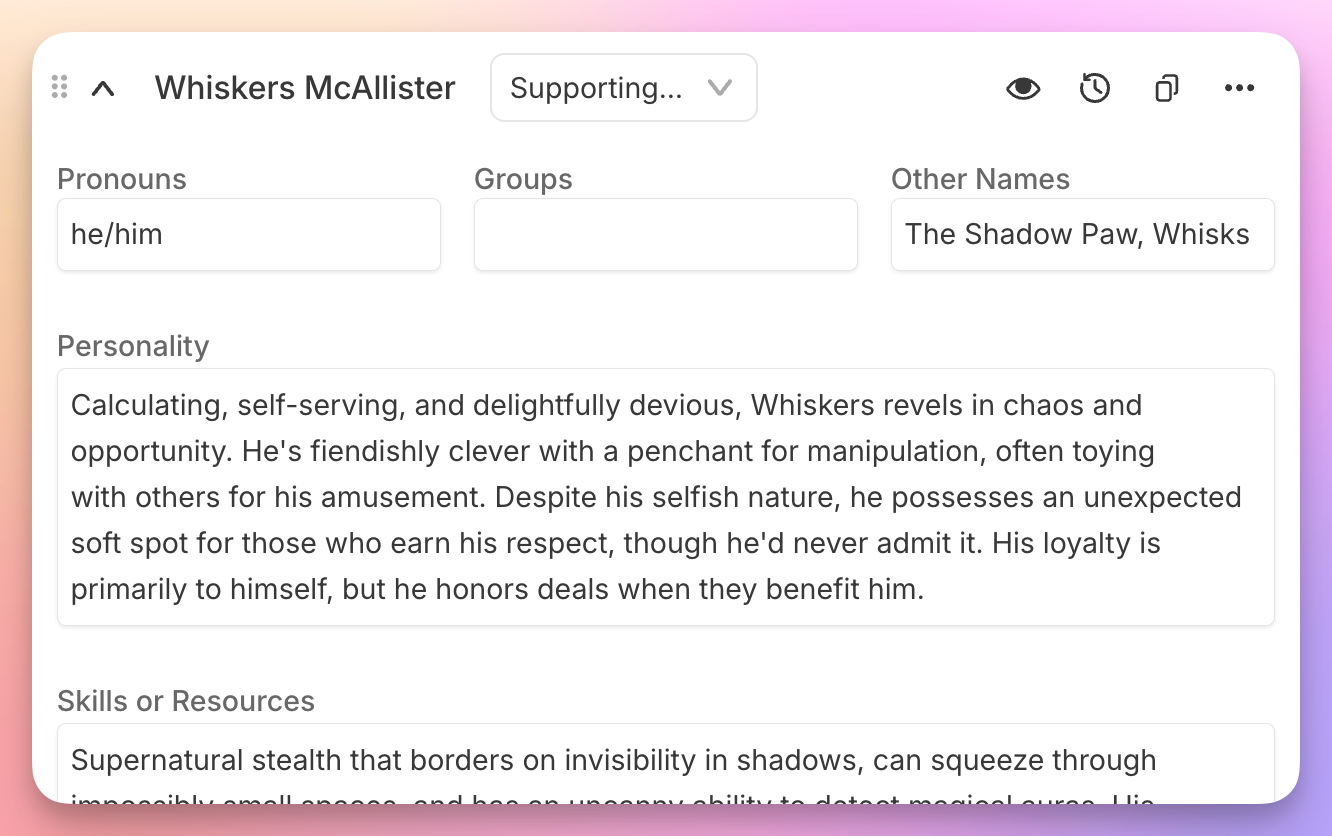
With your synopsis as context, build character cards. Each card holds pronouns, personality traits, background, physical description, and dialogue style. Then populate Worldbuilding with settings, factions, lore, and rules. Because these sections read your synopsis, you're not starting from scratch — you're expanding on decisions you already made.
"Sudowrite makes it so much easier to write a chapter or short story — it's intuitive and helps me get the ideas out, fast."
— Liese Sherwood-Fabre, Author (Over 9,000 books sold)
Pro tip: Import existing characters from text files or CSV if you've already done this work elsewhere.
Step 4: Outline, Break Into Scenes, and Start Writing
What you'll accomplish: Go from structured plan to actual prose, with the AI reading every layer you've built.
Create your Outline — unlimited chapters, no word limit. Break each chapter into Scenes (individual story moments). When you hit Write, the AI reads your scenes, outline, characters, worldbuilding, genre, style, and synopsis. All of it. Across up to 25 linked chapters and 20,000 words of context.
"My first year using Sudowrite, I hit 1.2 million words. It helped me stay focused and productive."
— Eric, Novel/Fiction Writer
Pro tip: Link each chapter to a document using Chapter Continuity to maintain narrative flow across your entire manuscript.
Best Practices
Be Specific in Genre and Style — Vague Inputs Get Vague Output
"Fantasy" as a genre gives the AI almost nothing to work with. "Grimdark secondary-world fantasy with dry, sardonic narration" gives it a compass. The Style section in Sudowrite's Story Bible defines your prose rules — sentence rhythm, vocabulary, what to avoid. Invest ten minutes here and every generated passage will sound more like you.
Treat Your Synopsis as the Load-Bearing Wall
Every other section references your synopsis. If it's thin, everything downstream suffers — characters feel generic, outlines wander, worldbuilding drifts. Rewrite your synopsis until it captures the emotional arc, not just the plot sequence. The Braindump feeds it raw material, but you shape it into the foundation.
Use Scenes, Not Just Outline Bullets
An outline says "Elena confronts the mayor." A scene says "Elena confronts the mayor at the gala, discovers he's her father's old partner, and realizes the conspiracy is personal." Sudowrite generates better chapter drafts from scene-level detail because the AI has more context for tone, pacing, and character motivation.
"I published 270,000 words last year and I'm on track to surpass that this year, all thanks to Sudowrite's efficiency. I wouldn't be where I am without it."
— Gianmarco, Romance and Sci-Fi Writer
Common Mistakes
Building Sections in Isolation
The whole point of a layered story bible is that each section informs the next. Writers who skip the braindump and jump straight to characters end up with a cast that doesn't connect to their plot. Follow the sequence: Braindump, Synopsis, Genre/Style, Characters, Worldbuilding, Outline, Scenes. The order exists for a reason.
Writing a Story Bible and Never Updating It
A story bible that reflects chapter one but not chapter twenty is worse than no story bible at all. In Sudowrite, your Story Bible stays active — the AI reads it on every generation. But you still need to update character cards when characters evolve and add worldbuilding entries as your world expands.
Keeping It Too Shallow
"Marcus: male, tall, angry" is not a character card. It's a sticky note. Give the AI enough to work with — personality contradictions, speech patterns, motivations, the wound that drives their decisions. Sudowrite's character cards support dialogue style, background, and detailed physical descriptions for exactly this reason.
"Sudowrite has sped up how I write...we've published nine physical books, with thirty-two more waiting to go through editing."
— Erwin T. Hurst Sr, Founder of Family-Run Publishing Company
FAQ
What sections should a story bible template include?
A complete story bible template includes seven interconnected sections: braindump, synopsis, genre/style, characters, worldbuilding, outline, and scenes. The key is sequence — each section builds on the one before it, creating a layered reference that stays consistent. Sudowrite's Story Bible follows this exact workflow.
Can I use a story bible for a series of books?
Yes, and for series writers a story bible is practically mandatory. Tracking character evolution, worldbuilding rules, and timeline consistency across multiple books is where most writers lose control. Sudowrite's Series Folder shares Story Bible data across books, so characters and world details carry over without manual re-entry.
How is Sudowrite's Story Bible different from a regular template?
Sudowrite's Story Bible is generative and interconnected, not a blank form. A regular template gives you empty fields. Sudowrite generates content from your braindump, chains each section to the previous one, and feeds all of it to the AI during prose generation. The AI reads your Story Bible automatically — no copy-pasting context between sessions.
Do I need to fill out every section before I start writing?
No, but more Story Bible data produces better AI output. You can start writing with just a braindump and synopsis. But characters, worldbuilding, and outline sections give the Write feature more context to work with, which means prose that's more consistent and more aligned with your vision.
How long does it take to build a story bible in Sudowrite?
Most writers build a functional Story Bible in 30 to 60 minutes, compared to days for a manual approach. The guided workflow generates content at each step, so you're editing and refining rather than writing from scratch. 92% of Sudowrite users report completing manuscripts faster, according to Sudowrite's own user survey.
What if I already have notes and character sheets?
You can import existing characters from text files or CSV directly into Sudowrite. Paste your braindump notes into the Braindump section and let the platform generate a synopsis from them. You don't lose work you've already done — you layer Sudowrite's interconnected system on top of it.
"I'm impressed with how Sudowrite builds on user feedback. It's one of the few AI tools that truly listens to writers, constantly improving the writing experience."
— Piero, Non-Fiction Writer
Key Takeaways
A story bible isn't a checklist you fill out and forget. It's the connective tissue of your novel — the system that keeps your characters, world, and plot aligned across every chapter.
- Build in sequence: Braindump feeds synopsis, synopsis feeds characters, characters feed outline. Each layer makes the next one stronger.
- Sudowrite's Story Bible automates this layering and feeds every section to the AI during prose generation — no manual copy-pasting, no context loss between sessions.
- Invest in specificity. A detailed genre, style, and synopsis produce dramatically better output than vague inputs.
- Keep it alive. Update your Story Bible as your story evolves, so the AI stays aligned with where your novel is going, not just where it started.
"Sudowrite makes it so much easier to write a chapter or short story — it's intuitive and helps me get the ideas out, fast."
— Liese Sherwood-Fabre, Author